
Why Your Shopify Net Profit Is Lower Than You Think
Most Shopify store owners know their revenue number by heart. They check it first thing in the morning, screenshot it when it's a good month, and use it to measure whether the business is growing.
But revenue isn't what pays your rent. Shopify net profit is — and for most merchants, that number is significantly lower than they expect. Not because they're doing something wrong, but because Shopify's built-in reports don't show it.
This article breaks down exactly why, with real numbers. By the end, you'll know what's silently eating your margins and how to get a clear picture of what you're actually keeping.
What is Shopify net profit?
Net profit is what's left after you subtract every cost from your revenue. Not just the cost of goods, but shipping, Shopify fees, payment processing fees, advertising spend, returns, and any other operating expenses.
Net margin — the percentage version — tells you how many cents you keep for every dollar you bring in. If you're doing $50,000/month in revenue with $5,000 in net profit, your net margin is 10%.
That's the real number. Everything else is just a step toward it.
What Shopify's analytics actually show you
Shopify's native dashboard is excellent at tracking orders, sessions, and revenue. It even has a "Profit" report if you're on a higher plan. But here's the thing: that report only accounts for cost of goods sold (COGS) — and only if you've manually entered your product costs.
It does not factor in:
- Shopify subscription fees
- Shopify Payments transaction fees (or third-party payment processing fees)
- Shipping label costs
- Advertising and marketing spend
- App subscription costs
- Refunds and their associated fees (yes, you often don't get those back)
So when a merchant looks at their Shopify dashboard and sees "profit," what they're usually seeing is gross profit at best — and more often, just revenue with COGS subtracted. That's not the full picture.
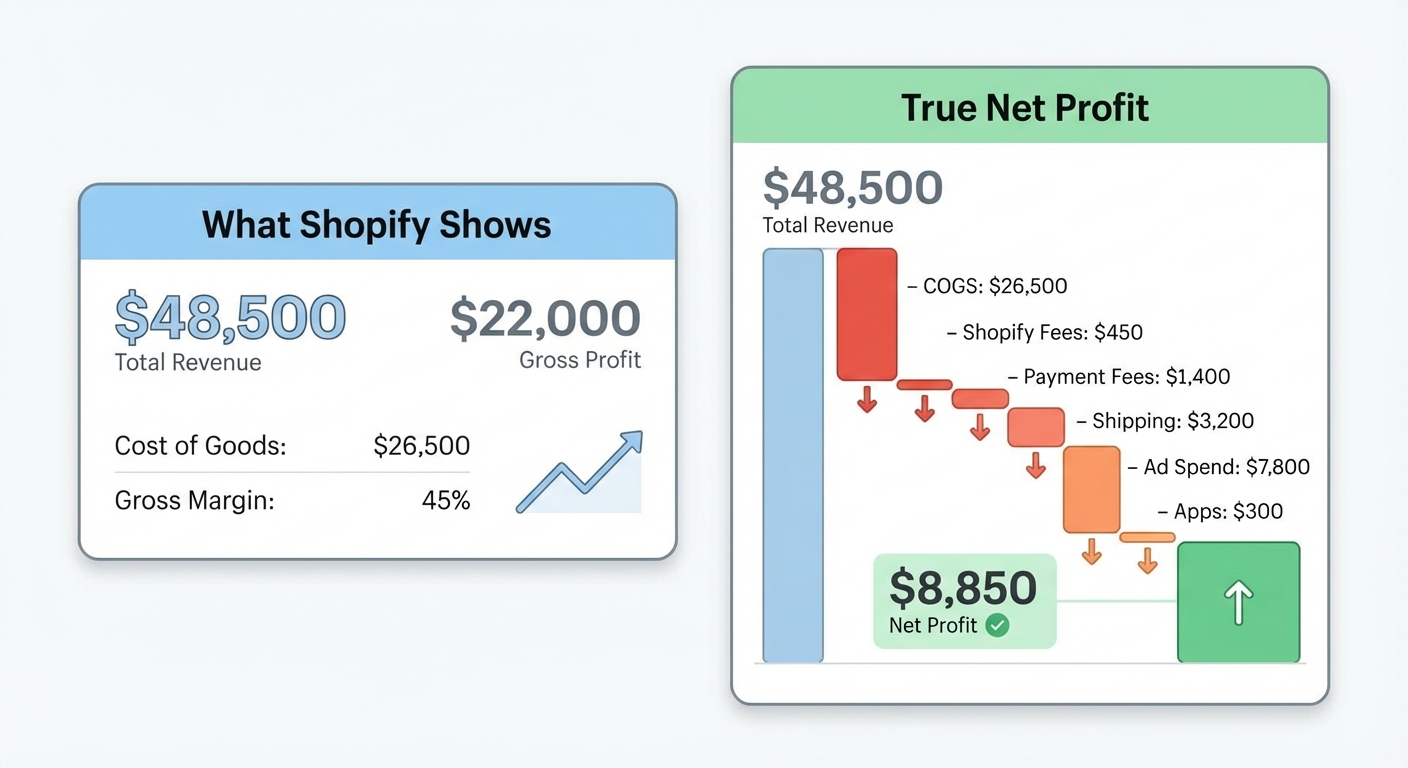
The costs that are quietly draining your profit
Let's walk through the specific line items that most merchants undercount or miss entirely. These aren't edge cases — they apply to almost every Shopify store.
Shopify Payments fees
If you're using Shopify Payments (the default for most US merchants), you're not paying a transaction fee to Shopify. But you are paying credit card processing rates. On the Basic plan, that's 2.9% + $0.30 per transaction. On Shopify plan, it's 2.6% + $0.10. On Advanced, it's 2.4% + $0.10.
On a $50,000/month store, the difference between Basic and Advanced is roughly $1,000/month in fees alone. Most merchants don't track this as a direct cost against each order.
And if you're using a third-party payment processor? Shopify charges an additional transaction fee on top — 2% on Basic, 1% on Shopify, 0.5% on Advanced. You can see the full Shopify fee breakdown here.
Shipping costs
Free shipping is one of the most effective conversion tactics in e-commerce. It's also one of the most common ways merchants accidentally shrink their margins.
A merchant selling a $45 product with a $6 COGS might feel like they're printing money. But if shipping a package via USPS Priority Mail costs $9.50 and they're offering free shipping, that's already $15.50 in costs — and they haven't paid Shopify, their ads, or themselves yet.
Shipping costs vary by carrier, zone, and package weight, which makes them hard to average mentally. Stores that don't track actual shipping spend per order are almost always underestimating it.
Refunds and chargebacks
Here's something most merchants don't realize: when a customer gets a refund, Shopify Payments only refunds the Shopify transaction fee — not the payment processing fee. That 2.9% + $0.30 is gone.
On a $100 order that gets refunded, you lose $3.20 in fees you'll never recover. If you're running a category with even a modest 5% return rate, this adds up fast. A store doing $50,000/month with a 5% return rate loses roughly $800/year just in unrecovered processing fees.
Chargebacks are worse. Beyond the refunded revenue, most payment processors charge a $15–$25 dispute fee, even if you win.
Ad spend attribution
This is the big one. Most merchants have a rough idea of what they're spending on Facebook or Google ads. But "ad spend" as a category hides a lot.
Are you accounting for the time-lag between ad spend and attributed revenue? Are you tracking whether your ROAS is calculated on revenue or on actual profit? A 3x ROAS sounds solid. But if your product margin before ads is 40%, a 3x ROAS means you're breaking even — not growing. We'll cover the ROAS trap in a separate article, but the short version is: ROAS calculated on revenue is nearly meaningless for understanding real profitability.
App costs
The average Shopify merchant uses 6–10 paid apps. A review app at $15/month, a subscription app at $49/month, an upsell tool at $29/month, an email platform at $60/month. It adds up to $200–$400/month before you've noticed.
These costs are easy to rationalize individually but almost never tracked against profit collectively. They're just credit card charges that appear in the background.
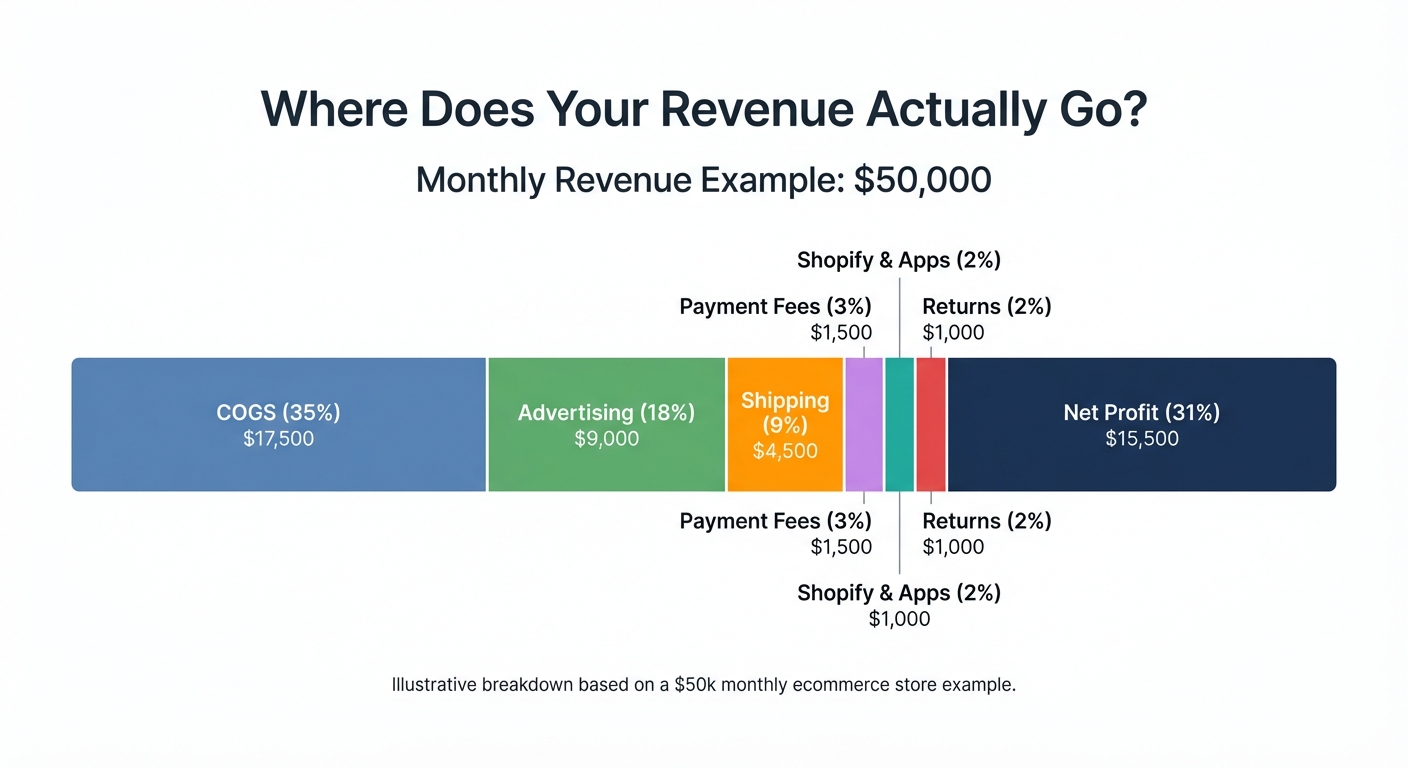
Want to see your real numbers?
Try our free profit calculator — plug in your numbers and see your real net margin in 30 seconds.
Try the free calculator →A real example: $50k revenue, $8,850 net profit
Let's put this together. A mid-size Shopify store on the Basic plan:
| Line Item | Amount |
|---|---|
| Monthly Revenue | $50,000 |
| Cost of Goods Sold | – $17,500 (35%) |
| Shopify Subscription | – $39 |
| Payment Processing (2.9% + $0.30) | – $1,480 |
| Shipping Costs | – $4,500 |
| Ad Spend (Facebook + Google) | – $9,000 |
| App Subscriptions | – $280 |
| Returns & Refunds | – $1,350 |
| Net Profit | $15,851 |
Wait — $15,851 sounds decent. But this assumes every variable is under control and COGS are tracked accurately. Most merchants don't have their COGS fully loaded (warehousing, packaging, sourcing time). And many are spending more on ads than they think once you account for testing spend and campaigns that didn't convert.
If COGS are actually 45% and ad spend is closer to $12,000 (common for stores relying heavily on paid traffic), the same $50,000 revenue store might look like this:
| Line Item | Amount |
|---|---|
| Monthly Revenue | $50,000 |
| COGS (45%) | – $22,500 |
| Shopify + Apps | – $319 |
| Payment Processing | – $1,480 |
| Shipping | – $4,500 |
| Ad Spend | – $12,000 |
| Returns | – $1,350 |
| Net Profit | $7,851 |
That's a net margin of 15.7% — not terrible, but a long way from what the revenue number implies. And plenty of stores are even lower.
Why merchants overestimate their Shopify net profit
There are a few specific reasons this gap is so common.
Revenue feels real; costs feel abstract. When a sale comes in, it's concrete and exciting. When a fee is deducted in the background, it doesn't register the same way. The Shopify dashboard reinforces this by making revenue the hero metric.
Costs are scattered across platforms. Ad spend lives in Meta Business Manager. Shipping is in ShipStation or your carrier account. Shopify fees are in your admin billing. App charges are on your credit card. Nobody is pulling these together automatically.
COGS are often wrong. If you set up product costs once and never revisited them, they're almost certainly outdated. Supplier prices change. Your product bundling changes. And many merchants never set COGS up in the first place.
Returns are invisible. Most store owners track their return rate loosely ("feels like about 3%"). Very few track the full financial impact including unrecovered fees.
How to actually see your real profit
The straightforward approach is to build a profit and loss tracker in a spreadsheet. Pull your revenue from Shopify, your ad costs from each ad platform, your shipping from your carrier, your fees from your Shopify admin, and your app costs from your credit card. Add them up monthly.
This works. It's also about two to three hours a month of manual data-pulling — and it's only as accurate as your COGS.
The better approach is to use a tool that connects to Shopify and does this automatically. Shopimize pulls in your Shopify revenue, COGS, fees, and shipping costs, then lets you add ad spend to produce a real-time net profit number. Instead of checking your Shopify dashboard and feeling good about revenue, you see actual profit — by day, by product, by order.
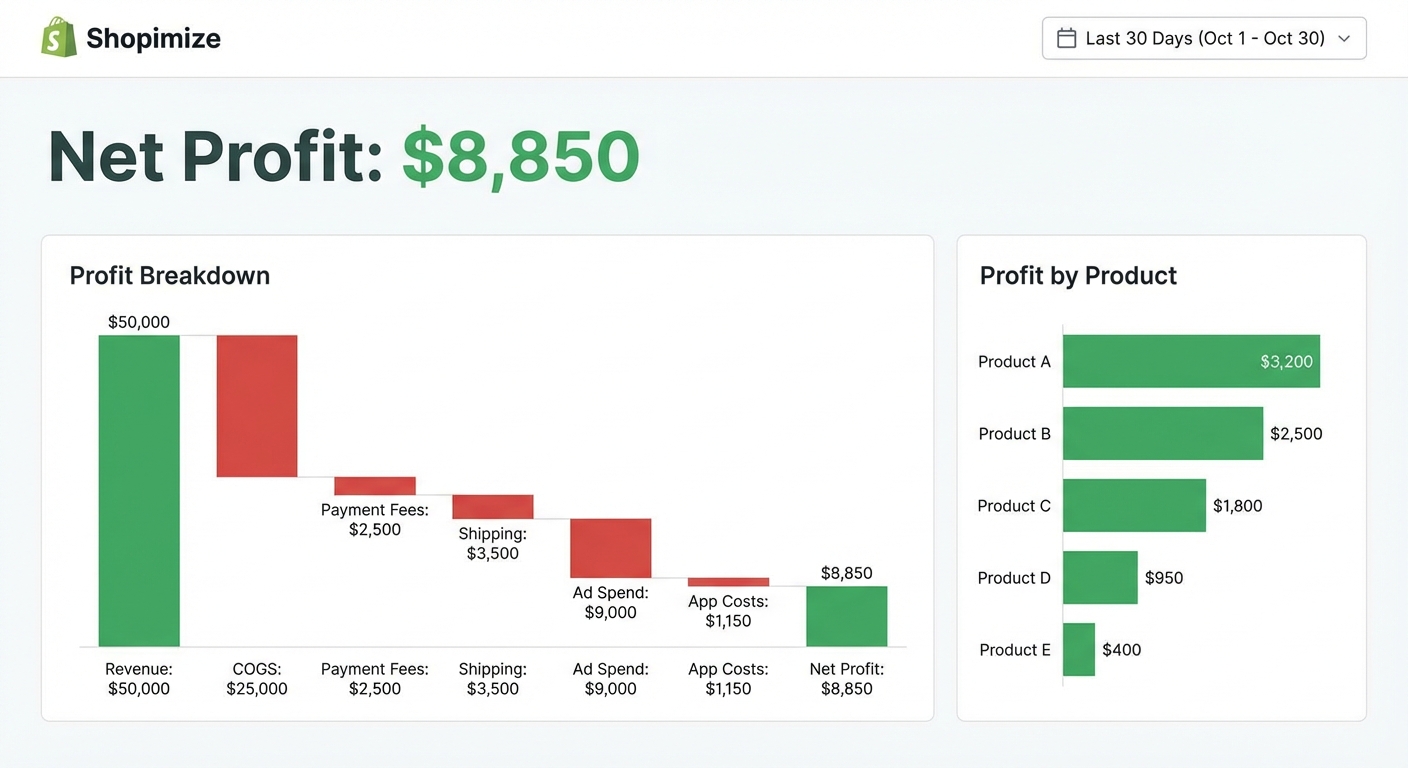
The habits that protect your margins
Seeing accurate numbers is step one. Acting on them is step two. A few habits that make a real difference:
- Set COGS for every product — and review them quarterly. Your supplier raised prices last spring. Did your product cost in Shopify get updated?
- Track shipping cost per order, not as a monthly total. Knowing your average shipping cost per order lets you price free shipping thresholds accurately.
- Review app spend monthly. Every quarter, open your app subscriptions and ask: is this earning its cost? A $49/month upsell app needs to generate measurable incremental revenue or it's a drag on margin.
- Separate ad spend by channel. Facebook and Google have different actual ROAS profiles for most businesses. Blending them hides which one is actually profitable.
- Calculate net margin by product, not just by store. Your best-selling product and your most profitable product are often not the same.
What a healthy net margin looks like
There's no single right answer, but here's a rough benchmark. Shopify stores that are product-first (owned brands, low-to-mid ad dependence) typically see net margins of 15–25%. Stores running heavy paid traffic tend to run 10–15% when things are working. Dropshipping stores often run below 10%.
If you're below 10% net margin and relying on paid traffic, the math is fragile. One CPM spike or one shipping rate increase can push you into the red without any single dramatic event.
For a deeper look at margin benchmarks by niche, Shopify's own commerce trends research is worth reading alongside your own numbers.
Your Shopify net profit is probably not what you think — but it can be
If there's one thing to take away from this: the gap between your revenue and your Shopify net profit is almost always bigger than it feels. Not because your business is broken, but because the tools merchants use by default weren't designed to show you the full cost picture.
The merchants who grow sustainably aren't the ones making the most sales. They're the ones who know exactly what each sale actually costs — and they adjust constantly based on that number.
Shopimize was built specifically to close this visibility gap for Shopify merchants. Connect your store, enter your product costs, and see your real profit number — not the one that looks good in screenshots.
FAQ
How do I find my net profit on Shopify?
Shopify doesn't natively show true net profit. The built-in profit report on Shopify's higher-tier plans only deducts cost of goods sold (COGS) — it doesn't account for payment processing fees, shipping costs, ad spend, or app fees. To calculate your actual net profit, you need to subtract all of those costs from your revenue, either manually in a spreadsheet or using a dedicated profit analytics tool like Shopimize.
What is a good net margin for a Shopify store?
For most Shopify stores, a net margin of 15–25% is a healthy target if you're running a branded product store with moderate ad spend. Stores heavily dependent on paid traffic often operate at 10–15% when optimized. Anything below 10% leaves very little room for error — one bad ad month or a shipping rate increase can wipe out profit entirely.
Why does Shopify show profit but my bank account doesn't reflect it?
The "profit" Shopify reports is usually gross profit — revenue minus COGS only. It doesn't include your Shopify subscription, payment processing fees, shipping expenses, advertising spend, or app costs. These costs are real but they're spread across different platforms and billing statements, so they don't appear in your Shopify analytics. That gap between what Shopify reports and what lands in your account is exactly why tracking true net profit matters.
Does Shopify charge fees that reduce my profit?
Yes. If you're on Shopify Payments, you pay credit card processing fees on every transaction — 2.9% + $0.30 per order on the Basic plan, lower on higher plans. If you use a third-party payment gateway, Shopify adds an additional transaction fee of 0.5%–2% depending on your plan. Your monthly Shopify subscription is also a direct cost against your profit. Individually these feel small; collectively, on a $50,000/month store, fees can easily exceed $1,500/month.