
The Shopify Hidden Fees Quietly Cutting Your Margins
You check your Shopify dashboard. Revenue is up. Orders are flowing. Things look good.
Then you look at your bank account.
The numbers don't match — and not in a small way. There's often a gap of 20%, 30%, sometimes more between what Shopify says you made and what actually lands in your account. That gap has a name: shopify hidden fees. Not one big charge you missed, but a dozen small ones that compound quietly, every single day.
This article breaks down exactly where that money goes.
What are Shopify hidden fees?
"Hidden fees" doesn't mean Shopify is being deceptive. The fees are disclosed — they're just scattered across your plan terms, payment settings, app subscriptions, and carrier agreements. No single screen shows them together, which means most merchants never see the full picture.
Hidden fees are any costs that reduce your real profit but don't show up automatically in your Shopify revenue reports. They include transaction fees, payment processing charges, app subscriptions, and more.
The fees that hit every single order
These are the ones that hurt most, because they scale directly with your volume. The more you sell, the more you pay.
Transaction fees (if you're not using Shopify Payments)
If you use a third-party payment processor — Stripe, PayPal, Square — Shopify charges you an additional transaction fee on top of whatever your processor charges. On the Basic plan, that's 2% per order. On Shopify plan, it's 1%. On Advanced, 0.5%.
That sounds small. But if you're doing $30,000 a month on the Basic plan, you're handing $600 every month directly to Shopify before your processor even touches the money.
Most merchants switch to Shopify Payments to avoid this. Smart move. But Shopify Payments has its own fee structure.
Shopify Payments processing fees
Shopify Payments charges a per-transaction rate depending on your plan:
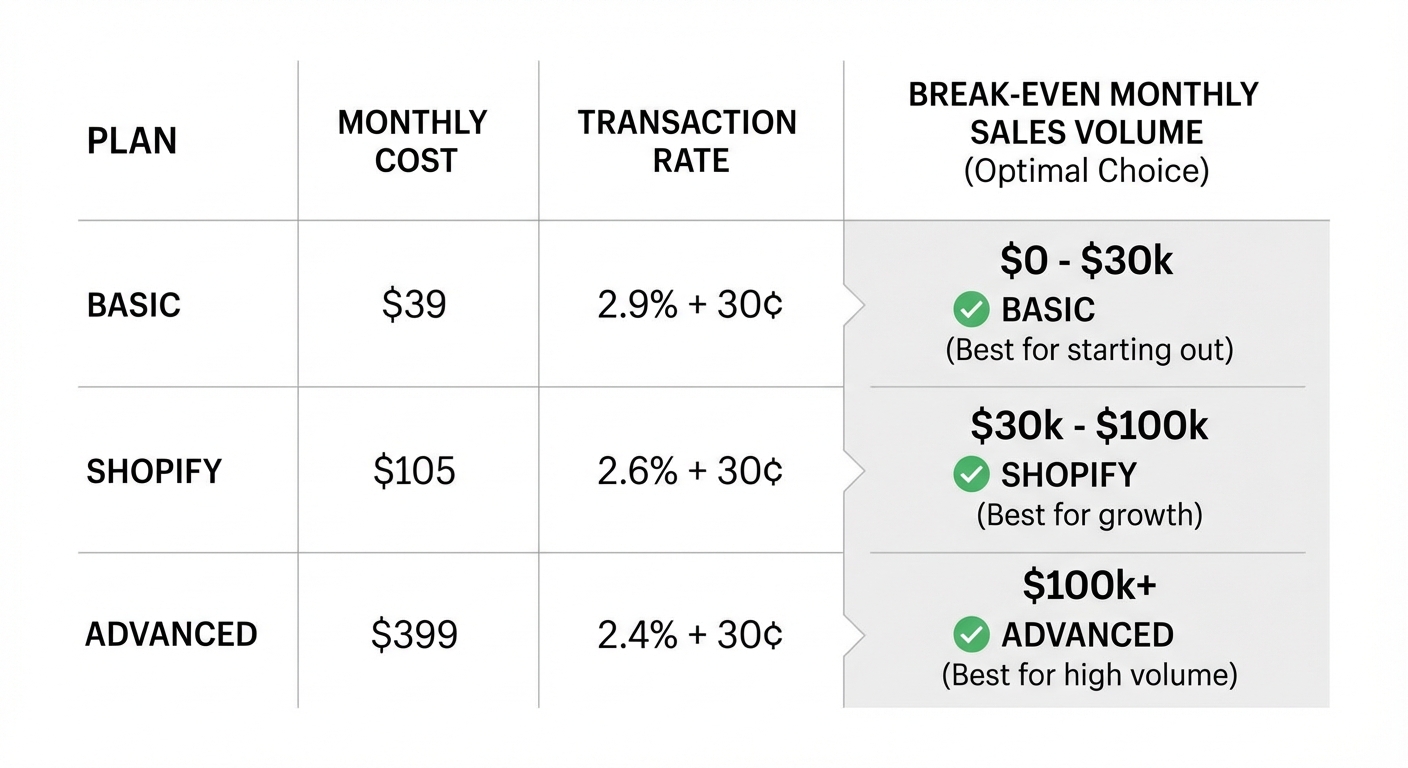
- Basic: 2.9% + $0.30 per transaction
- Shopify: 2.6% + $0.10 per transaction
- Advanced: 2.4% + $0.10 per transaction
On a $60 order, Basic plan, that's $2.04 in processing fees. Doesn't sound like much. But across 500 orders a month, you're at $1,020. And this fee applies to every single order — including orders you eventually refund.
What happens when you issue a refund
Here's something a lot of merchants don't realize: when you refund a customer, Shopify Payments doesn't refund the processing fee. You ate the fee on a sale that produced zero revenue.
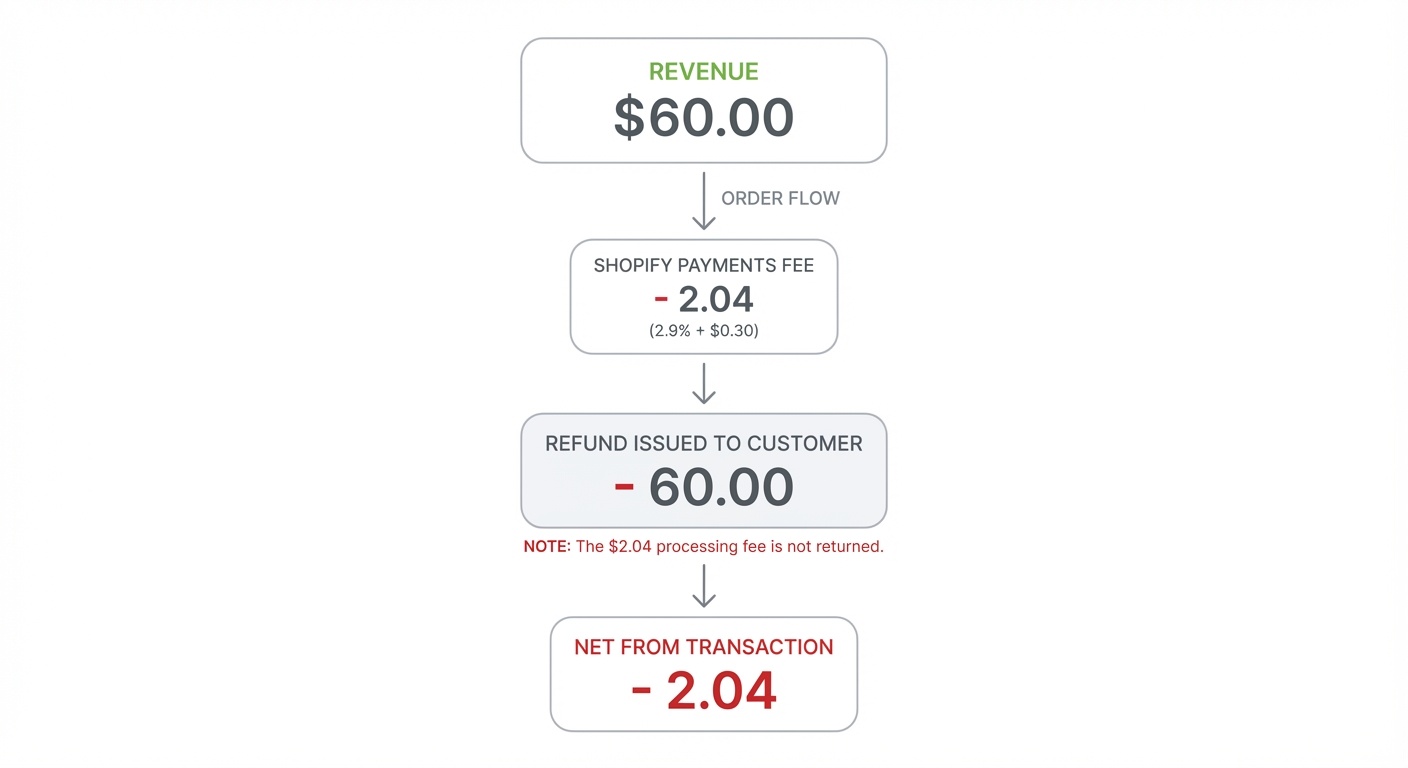
If your return rate is 10% — which is normal for apparel — and your average order is $60, that's $2.04 × 10% × 500 orders = $102 in fees paid on sales that went nowhere. Every month.
The Shopify plan itself — and what you're actually paying
Your monthly plan fee is obvious. But the question most merchants don't ask is: are you on the right plan?
The Basic plan costs $39/month. The Shopify plan costs $105/month. That's a $66/month difference.
But the processing fee drops from 2.9% to 2.6% when you upgrade. On $30,000/month in sales, that 0.3% difference saves you $90/month — more than covering the upgrade cost, with $24 left over.
The math flips again at higher volumes. At $100,000/month, upgrading from Shopify ($105) to Advanced ($399) saves you 0.2% in fees, or $200/month. You come out ahead by $94/month.
Most merchants pick a plan once and never revisit it. That's $94 or more leaking out every month for no reason.
Want to see your real numbers?
Try our free profit calculator — plug in your numbers and see your real net margin in 30 seconds.
Try the free calculator →App fees: the subscription creep nobody tracks
The average Shopify store runs 6 to 10 apps. Most of them charge monthly. A few are free. The rest add up faster than you'd expect.
Here's what a typical mid-volume store's app stack looks like:
- Email marketing (Klaviyo): $45/month
- Reviews app (Okendo): $19/month
- Subscription management: $49/month
- Upsell/cross-sell app: $29/month
- Loyalty program: $49/month
- SEO app: $29/month
- Helpdesk tool: $39/month
That's $259/month — $3,108 per year — before you've shipped a single product.
The problem isn't that these tools are bad. Most of them earn their keep. The problem is that merchants install apps during a growth push, scale back, forget to cancel, and keep paying for tools they barely use. We've seen stores carrying $400+/month in apps they'd completely forgotten about.
App fees are particularly insidious because they're fixed costs that don't scale down with your revenue. A bad month doesn't reduce your app bill.
Shopify shipping fees and label costs
If you're buying shipping labels through Shopify Shipping, you're getting discounted rates — but they're not free, and they're often not the cheapest available.
Shopify Shipping offers discounts with USPS, UPS, DHL, and others. But the actual rates you get depend on your plan and your volume. Lower-volume merchants on Basic may be paying more per shipment than a merchant on Advanced with negotiated rates.
More importantly: the cost of labels often isn't properly tracked against per-order profit. Merchants look at their gross margin, see it's 45%, and feel comfortable — without realizing that $6.50 in average shipping cost per order, against a $40 average order value, just shaved another 16% off their real margin.
Per-order economics matter. You can have a 45% gross margin on product and a 12% net margin per order once shipping is in the picture.
For more on how Shopify calculates fees, Shopify's official documentation on payment processing is worth reviewing — especially if you're unsure which fees apply to your specific plan.
Currency conversion and international orders
If you sell internationally and receive payment in a foreign currency, Shopify Payments charges a 1.5% currency conversion fee when those funds are converted to USD.
This one flies completely under the radar for most merchants. You see the sale in USD on your dashboard. You don't see the conversion fee deducted before it hits your account.
If 20% of your orders come from international customers and you're doing $30,000/month total, that's $6,000 in international revenue × 1.5% = $90/month in conversion fees you may never have noticed.
Chargebacks: the fee you pay even when you win
Chargebacks are when a customer disputes a charge with their bank. Even if you fight the chargeback and win, you still pay the $15 dispute fee that Shopify Payments charges.
If you lose the chargeback, you lose the fee and the sale.
For stores with high chargeback rates — certain niches like electronics, collectibles, and digital goods see this more often — this can add up to hundreds of dollars a month in fees alone, separate from the lost revenue.
How to actually calculate your true profit per order
Here's a worked example so you can see what this looks like in practice.
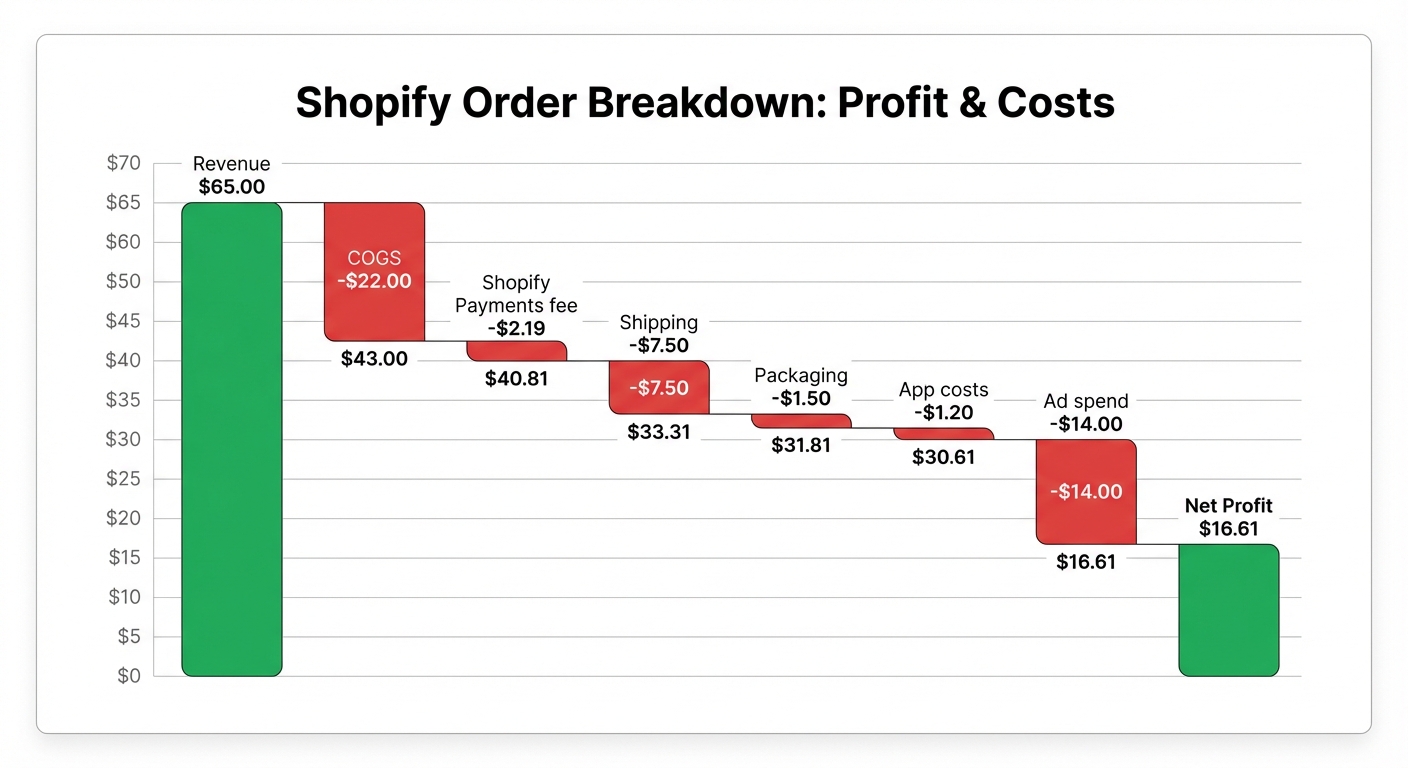
A store sells a product for $65. Here's the real breakdown:
| Item | Amount |
|---|---|
| Sale price | $65.00 |
| Cost of goods sold (COGS) | −$22.00 |
| Shopify Payments fee (2.9% + $0.30) | −$2.19 |
| Shipping label cost | −$7.50 |
| Packaging | −$1.50 |
| Proportional app cost per order* | −$1.20 |
| Proportional ad spend per order** | −$14.00 |
| Real profit per order | $16.61 |
*$259/month in apps ÷ 216 orders = $1.20 per order
**Facebook ad spend to acquire this order
That's a 25.6% net margin — not bad. But if this merchant looked only at their product margin (revenue minus COGS), they'd see 66% and feel very comfortable.
The difference between what they think they're making and what they're actually making is $48.39 per order. At 216 orders a month, that's a $10,452/month gap in financial understanding.
Why Shopify's built-in reports don't show you this
Shopify's analytics are built around sales performance, not business profitability. The platform tracks orders, revenue, traffic, and conversion — all the metrics that tell you how your store is performing as a sales channel.
What it doesn't do is pull together your COGS, your app subscriptions, your real shipping costs, your processing fees, and your ad spend into a single profit number per order.
That's not a criticism of Shopify. It's just not what the platform was designed for. But the gap leaves merchants making decisions based on incomplete information.
Seeing your real profit numbers
Tracking shopify hidden fees manually is possible, but it requires pulling data from multiple sources — your Shopify admin, your ad platforms, your bank statements, your app billing — and reconciling it yourself in a spreadsheet. Most merchants do this once, find it painful, and go back to eyeballing revenue.
Shopimize connects all of those data points automatically. Every order gets a full cost breakdown: Shopify fees, COGS, shipping, ad spend attribution, and app costs — all accounted for. You get a real profit number per order, per product, and per day, without building formulas in a spreadsheet.
If you've been running your store on revenue numbers and a rough sense of your margins, seeing your actual per-order profit for the first time is usually a clarifying moment. Sometimes it's reassuring. Sometimes it's a wake-up call. Either way, it's the number you actually need to run your business.
The real cost of not knowing
The shopify hidden fees we've covered in this article aren't individually catastrophic. A $2.19 processing fee won't sink you. Neither will $1.20 in app costs per order.
But stacked together — processing fees, transaction fees, refund costs, shipping fees, currency conversion, app subscriptions, chargebacks — they can easily consume 15% to 25% of revenue that you thought was going into your pocket.
For a store doing $40,000/month in revenue, that's $6,000 to $10,000 a month disappearing into fees you never explicitly budgeted for. Annualized, that's between $72,000 and $120,000.
The good news: once you can see these fees clearly, you can manage them. You can choose the right plan, audit your app stack, factor real costs into pricing decisions, and catch problems before they become permanent margin damage. Most merchants who do this find at least two or three levers they can pull immediately.
Shopimize was built to give you that visibility — automatically, and without a finance degree.
FAQ
Do Shopify hidden fees apply to all plans?
Most fees apply across all Shopify plans, but the rates vary. Processing fees are lower on higher-tier plans, and transaction fees for third-party gateways are reduced or eliminated on Shopify Payments. Currency conversion fees (1.5%) and chargeback fees ($15) apply regardless of plan.
Does Shopify refund payment processing fees on refunds?
No. When you refund an order, Shopify Payments does not return the original processing fee. You absorb that cost even when the customer receives a full refund. This makes high-return-rate niches significantly more expensive to operate than their gross margins suggest.
How do I calculate my true profit per Shopify order?
Start with your sale price, then subtract: product cost (COGS), Shopify Payments processing fees, shipping label cost, packaging, a proportional share of your monthly app costs, and any ad spend attributed to that order. What remains is your real net profit per order. Doing this manually is tedious — tools like Shopimize automate the calculation across every order in your store.
Why doesn't Shopify show real profit in its analytics?
Shopify's reporting is designed around sales metrics, not profitability. It tracks revenue and orders very well, but it doesn't have access to your COGS data, your ad platform costs, or your full app subscription costs unless you manually enter them. Profit analytics requires pulling together data from multiple sources, which is why third-party tools exist specifically to solve this problem.