
How to calculate your true cost per order on Shopify
Here's a number that keeps surprising store owners: the average Shopify merchant underestimates their cost per order by 40-70%.
They know what they paid for the product. They might know their shipping cost. But when you stack on payment processing fees, their share of monthly ad spend, platform fees, packaging, and app subscriptions — the real number is almost always bigger than expected.
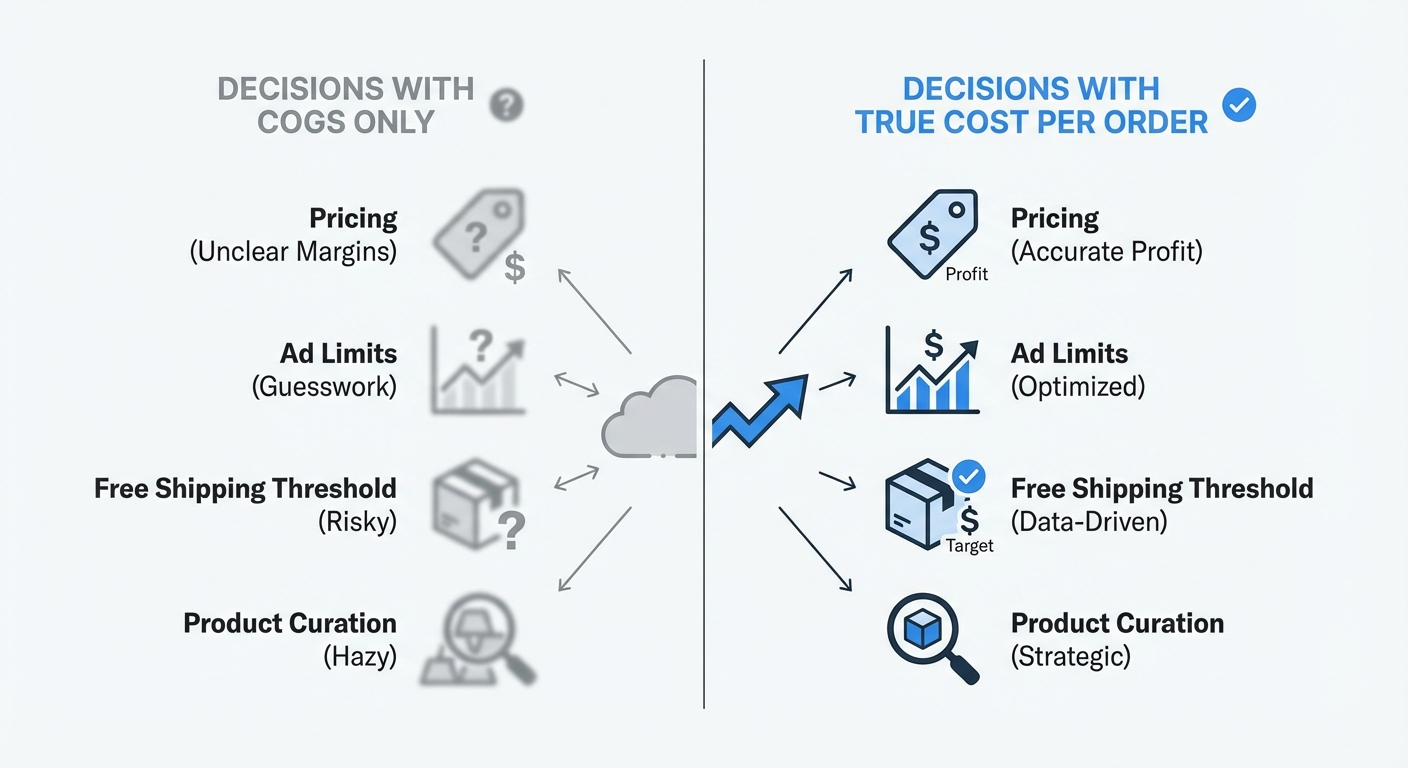
And if your cost per order is wrong, every decision built on it — pricing, ad budgets, free shipping thresholds, discount strategies — is built on bad math.
Let's fix that. We'll walk through exactly how to calculate your true cost per order, with real numbers, step by step.
What goes into a "true" cost per order
Most merchants think of cost per order as the price they paid their supplier. That's your COGS — cost of goods sold. It's the starting point, not the finish line.
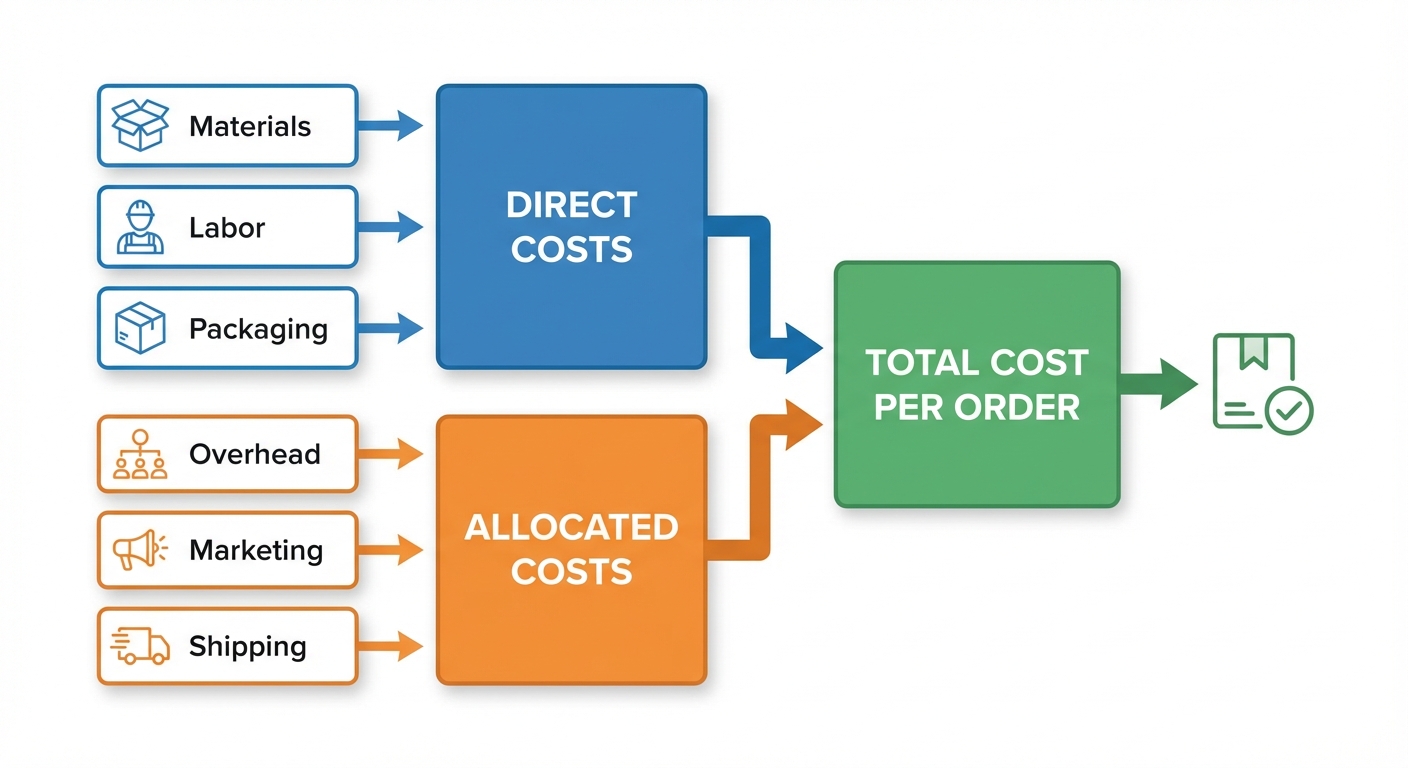
Your true cost per order includes every expense required to get that product from your supplier into your customer's hands, plus a fair share of the monthly costs that make your store run. Here's the full list:
Direct costs (per order):
- Product cost (COGS)
- Outbound shipping (what you pay the carrier)
- Packaging materials
- Payment processing fee (2.4-2.9% + $0.30 on Shopify Payments)
- Shopify transaction fee (if using a third-party gateway)
Allocated costs (monthly costs ÷ order count):
- Ad spend (Facebook, Google, TikTok, etc.)
- Shopify plan subscription
- App subscriptions
- Fulfillment center fees (if using 3PL)
- Virtual assistant or support labor
Some of these are fixed regardless of volume. Others scale with each order. Both need to be in the formula.
The cost per order formula
Here's the formula we use at Shopimize:
True Cost Per Order = Direct Costs + (Monthly Fixed Costs ÷ Monthly Orders)
Or broken down further:
True Cost Per Order = COGS + Shipping + Packaging + Processing Fee + (Ad Spend + Shopify Plan + Apps + Other Monthly Costs) ÷ Orders
The direct costs are straightforward — you can calculate them per order. The allocated costs require dividing your total monthly spend by your order count to get a per-order share.
This isn't perfect. Allocating a flat share of ad spend to every order ignores the fact that some orders come from organic traffic and cost nothing in ads. But as a blended average, it gives you the single most useful number for pricing and margin decisions.
A worked example: candle store at $50 AOV
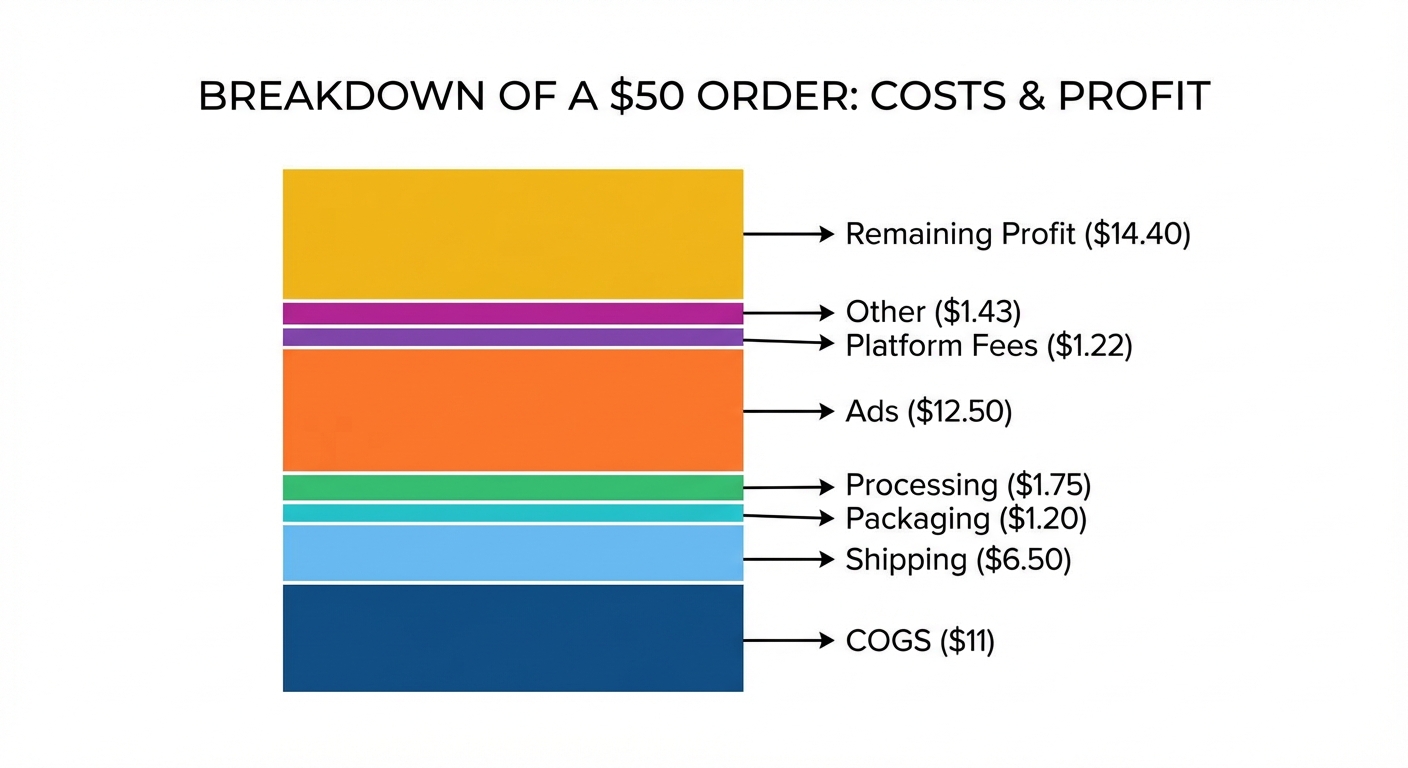
Let's use a real scenario. You sell scented candles with a $50 average order value. Last month you did 560 orders.
Direct costs per order
| Cost component | Calculation | Per order |
|---|---|---|
| Product cost (COGS) | Wax, wick, fragrance, jar | $11.00 |
| Outbound shipping | USPS Priority, avg weight | $6.50 |
| Packaging | Box, tissue, insert card | $1.20 |
| Payment processing | 2.9% × $50 + $0.30 | $1.75 |
| Direct total | $20.45 |
Monthly allocated costs
| Cost component | Monthly total | Per order (÷ 560) |
|---|---|---|
| Facebook Ads | $5,200 | $9.29 |
| Google Ads | $1,800 | $3.21 |
| Shopify Advanced plan | $399 | $0.71 |
| App subscriptions (6 apps) | $287 | $0.51 |
| Fulfillment labor | $800 | $1.43 |
| Allocated total | $8,486 | $15.15 |
True cost per order
$20.45 (direct) + $15.15 (allocated) = $35.60 per order
On a $50 order, that leaves $14.40 in profit — a 28.8% net margin.
If you'd only counted COGS ($11), you'd think your cost per order was $11 and your margin was 78%. The gap between $11 and $35.60 is where stores get into trouble.
Want to see your real numbers?
Try our free profit calculator — plug in your numbers and see your real net margin in 30 seconds.
Try the free calculator →Where most merchants get the math wrong
After looking at thousands of Shopify stores, the same mistakes come up over and over.
Mistake 1: Ignoring payment processing fees
It seems small — 2.9% plus $0.30. But on $28,000 in monthly revenue, that's roughly $1,000. On $100,000, it's $3,200. And if you're using PayPal or a third-party gateway, you're paying Shopify's additional transaction fee on top of that (0.5% to 2% depending on your plan).
Processing fees are invisible because they're deducted before the money hits your bank. You never "pay" them in the way you pay a supplier invoice. But they're real, and they compound.
Mistake 2: Leaving ad spend out of the equation
This is the big one. Your Facebook Ads budget isn't separate from your store economics — it's part of the cost of every order those ads generated.
If you spent $7,000 on ads last month and got 400 orders, your blended cost of acquisition is $17.50 per order. That's real money that belongs in your cost per order calculation. Without it, every product looks more profitable than it actually is.
Mistake 3: Forgetting about returns
A returned order isn't just a neutral event. You lose the original processing fee (Shopify doesn't refund it), you pay for return shipping, and the item might not be resellable. On top of that, you spent ad money to acquire that customer.
A $50 return can cost you $65-$75 in total losses. If your return rate is 8%, that's eating into your margins on every order — because the returns have to be absorbed by the orders that stick.
Mistake 4: Using COGS as a proxy for total cost
This is the most common simplification, and it's the most dangerous one. COGS typically represents only 30-40% of your total cost per order. Building your pricing, ad strategy, or discount rules around COGS alone means you're working with less than half the picture.
How cost per order changes your decisions
Once you know your true cost per order, a few things snap into focus.
Your free shipping threshold makes more sense. If your cost per order is $35.60 and you offer free shipping on orders over $50, you know exactly how tight that margin is. Maybe $65 is a better threshold — or maybe you need to raise prices by $3 to make free shipping sustainable.
Your ad budget has a ceiling. If your average order profit (before ads) is $27 and you're spending $17.50 per acquisition, that works. But if your cost-per-acquisition creeps up to $25, you're making $2 per order. Knowing the exact number lets you set hard limits in your ad platforms.
Your discount strategy needs guardrails. A 20% discount on a $50 order reduces revenue by $10. If your profit per order was $14.40, it's now $4.40. That's a 69% drop in profit for a 20% discount. The math only works if the volume increase is dramatic — and you can only evaluate that if you know your starting profit per order.
Product decisions become clearer. When you calculate cost per order at the product level (not just the store level), you'll often find that 10-20% of your catalog is barely breaking even or losing money. Those products look fine on the revenue dashboard. They look very different through a profit lens.
How to calculate it for your store (step by step)
You can do this in under 15 minutes with a calculator and your Shopify admin open.
Step 1: Get your monthly order count. Go to Analytics → Reports → Orders over time. Note the total for last month.
Step 2: Calculate your average COGS. If you've entered cost per item in Shopify, use the Profit by Product report. Divide total COGS by total orders. If you haven't entered costs, start with your top 10 products — that usually covers 60-80% of your orders.
Step 3: Find your average shipping cost. Check your shipping carrier account (USPS, UPS, ShipStation, or whoever handles fulfillment). Divide total shipping charges by total orders.
Step 4: Calculate your processing fees. Go to Settings → Payments → View payouts. Add up the fee column for the month. Divide by total orders.
Step 5: Total your monthly fixed costs. Add up: ad spend (from each platform's dashboard), Shopify plan cost, app subscriptions (Settings → Apps and sales channels), fulfillment or labor costs, and any other recurring expenses.
Step 6: Divide and add. Divide your monthly fixed costs by your order count. Add that to your per-order direct costs from steps 2-4.
That's your true cost per order.
If the number surprises you — and it usually does — you're now in a position to do something about it. Raise prices on low-margin products. Cut apps you're not using. Tighten your ad spend limits. Set a more realistic free shipping threshold.
Or, if you'd rather not do this manually every month, Shopimize calculates it automatically for every order, in real time, with all your costs connected.
Frequently asked questions
What is a good cost per order for Shopify?
It varies by niche, but most healthy Shopify stores have a total cost per order that's 55-75% of their average order value, leaving a net margin of 25-45% on gross margin and 10-25% on net margin. If your total cost per order exceeds 85% of your AOV, there's usually a specific cost category that's out of line — most often ad spend or shipping.
Should I include ad spend in cost per order?
Yes — as a blended average. While not every order comes from paid ads, your ad spend is a real cost of running the business. Excluding it gives you an inflated view of per-order profitability. The blended approach (total ad spend ÷ total orders) gives you the most useful number for pricing and margin decisions.
How often should I recalculate my cost per order?
Monthly at minimum. Costs shift — shipping rates change, ad performance fluctuates, you add or drop apps, COGS varies with supplier pricing. A number from three months ago may not reflect today's reality. Automated tools like Shopimize update this continuously so the number is always current.
What's the difference between cost per order and cost per acquisition?
Cost per acquisition (CPA) measures only your marketing cost to get a customer — typically ad spend divided by conversions. Cost per order is broader: it includes CPA plus product cost, shipping, fees, and everything else. CPA tells you how efficiently your ads are running. Cost per order tells you whether the business is making money.
Your cost per order is your most important number
Revenue tells you how much is coming in. Cost per order tells you how much is going out — on every single sale. The gap between those two numbers is your business.
Most Shopify merchants don't know this number. The ones who do make better decisions about pricing, ads, shipping, and which products to keep or drop. It's the difference between growing confidently and growing blindly.
Want to see your true cost per order — automatically, for every order? Try Shopimize free and connect your store in under two minutes.