
Shopify Transaction Fees: What You Actually Pay Per Order
You get an order for $50. You feel great. Your bank account gets less than you think it should. Sound familiar?
Shopify's fee structure is like a onion—peel back one layer and there's another underneath. Most store owners I talk to are shocked when they actually calculate what they're paying. There's your subscription. There's payment processing. There's the gateway fee. Oh, and there's that little currency thing if you sell internationally. And then apps.
The fees are real. They're substantial. And most importantly, you can control them if you understand them.
Let me walk you through exactly what you're paying, order by order.
The Five Fee Layers That Stack Up
1. The Monthly Subscription Fee
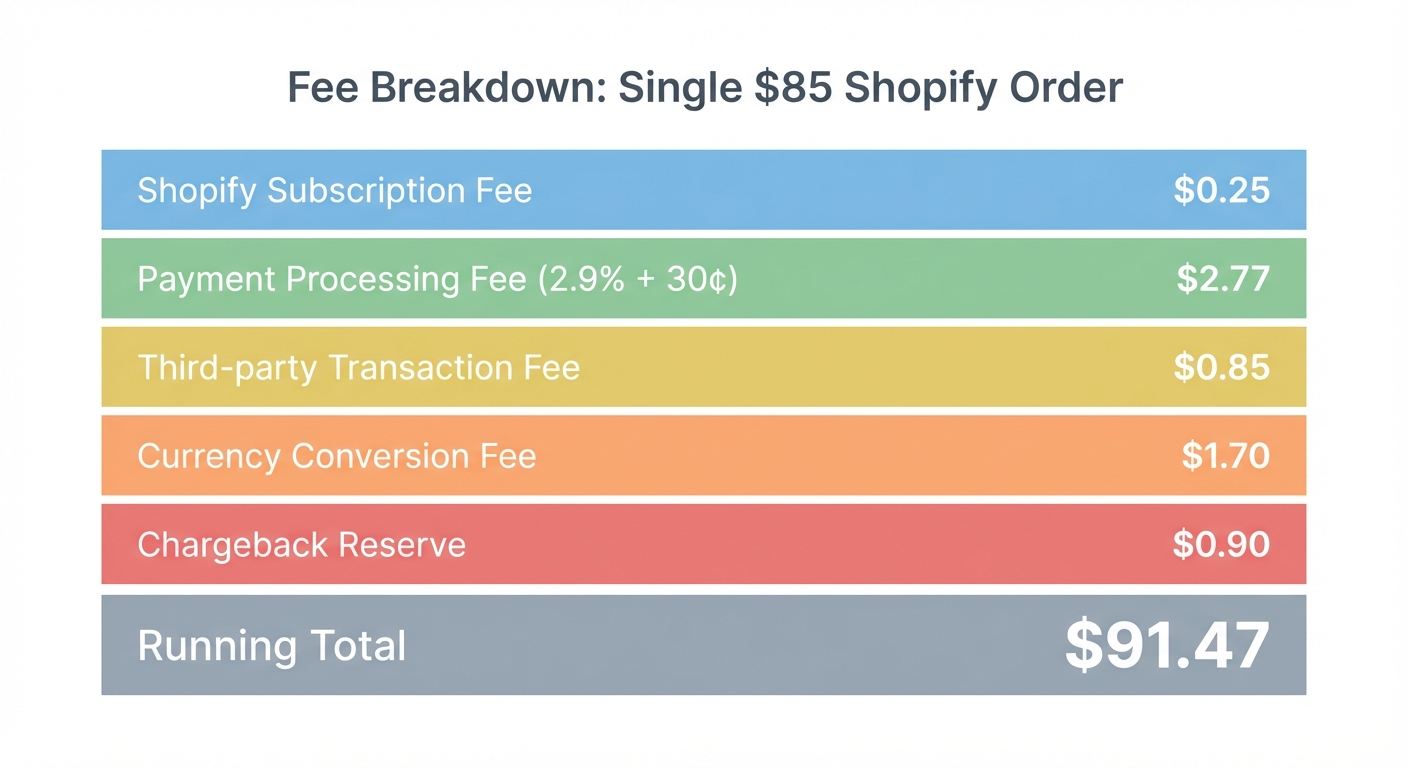
Shopify has three main plans, and they cost money whether you make a sale or not.
- Basic plan: $39/month
- Shopify plan: $105/month
- Advanced plan: $399/month
There are cheaper options (the Starter plan at $5/month if you're not doing much), but let's focus on the main three.
These monthly fees sit on top of everything else. They're your baseline cost.
[IMAGE PLACEHOLDER: Shopify pricing plans comparison with subscription prices clearly visible]
2. Shopify Payments Credit Card Processing Rates
This is where the money really goes. Shopify Payments is Shopify's built-in payment processor, and it charges a percentage of every order plus a fixed amount.
The rates depend on your plan:
| Plan | Domestic Cards | International Cards |
|---|---|---|
| Basic | 2.9% + $0.30 | 3.9% + $0.30 |
| Shopify | 2.6% + $0.30 | 3.6% + $0.30 |
| Advanced | 2.4% + $0.30 | 3.4% + $0.30 |
These percentages apply to every credit card transaction. Debit cards follow the same rates. It's automatic—deducted from your payout before the money hits your bank account.
3. Third-Party Payment Gateway Fees
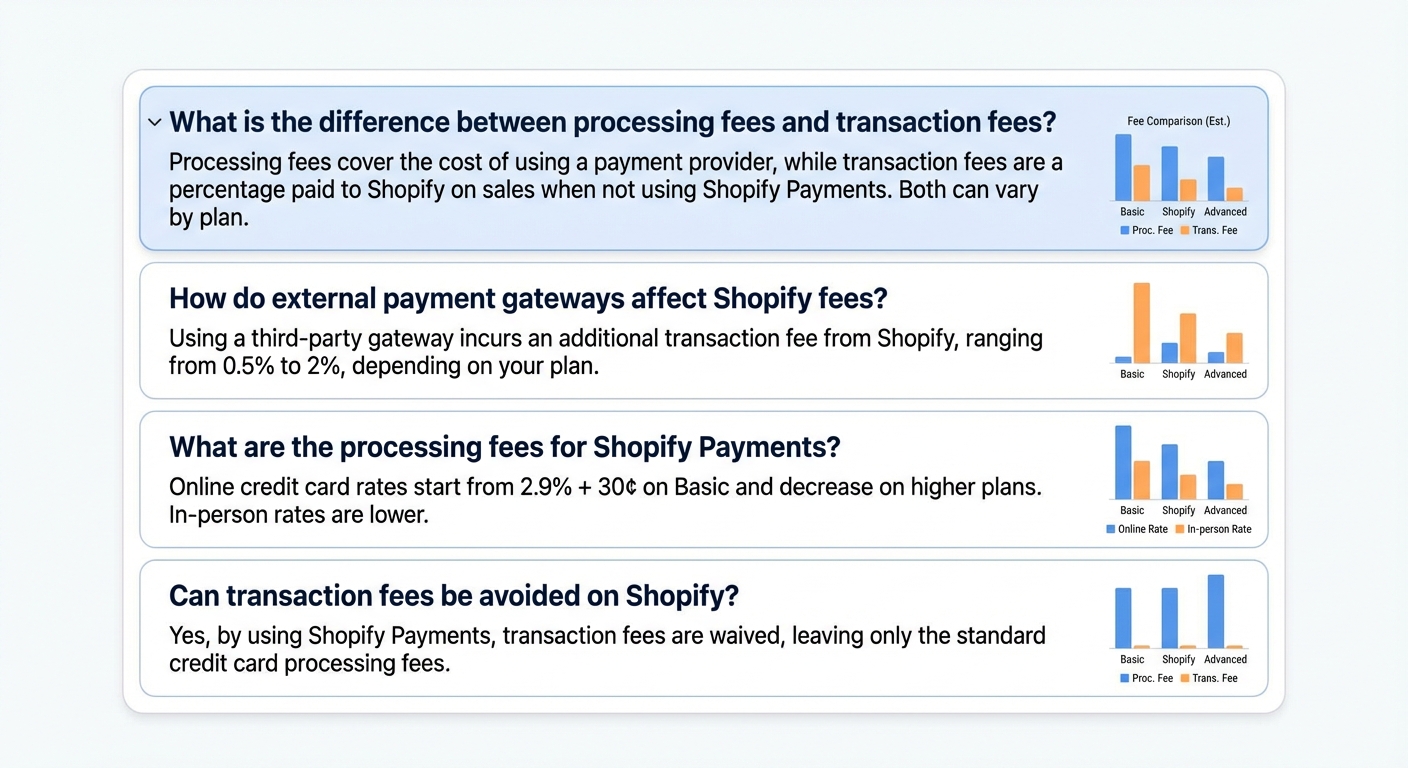
Here's where most people get tripped up. If you don't use Shopify Payments, you need an external payment gateway (like Stripe, PayPal, Square). Shopify charges you an extra fee on top of whatever the gateway charges.
These are called "transaction fees" in Shopify's world:
| Plan | Transaction Fee |
|---|---|
| Basic | 2.0% |
| Shopify | 1.0% |
| Advanced | 0.5% |
So if you're using Stripe (which charges around 2.9% + $0.30), you're paying Stripe's fee plus Shopify's transaction fee. That's stacking fees on top of fees.
This is why using Shopify Payments actually makes sense for most stores—you avoid the second fee entirely.
4. Currency Conversion Fees
Sell internationally? If a customer pays you in a currency different from your store's currency, Shopify charges 1.5% to convert it.
So a customer paying you $100 CAD when your store is in USD? Shopify takes 1.5% to convert it. That's on top of the payment processing fees.
This only applies if you're using Shopify Payments. Some third-party gateways handle this differently (often cheaper or built into their rate).
5. App Fees
Most Shopify stores don't run on Shopify alone. You're probably using apps for:
- Email marketing
- Inventory management
- Accounting
- Analytics
- Shipping automation
- Loyalty programs
The average Shopify store spends $50–$300 per month on apps. Some spend way more.
These add up fast. And unlike transaction fees, they're the same whether you sell $1,000 or $10,000 that month.
[IMAGE PLACEHOLDER: Dashboard showing typical app subscription costs stacking up]
The Real Cost: What a $50 Order Actually Costs You
Let's get concrete. I'm going to walk through what happens to a $50 order across each plan, using Shopify Payments.
Basic Plan ($39/month)
- Order total: $50.00
- Shopify Payments fee: 2.9% + $0.30 = $1.45 + $0.30 = $1.75
- Monthly subscription (allocated per order at 500 orders/month): $39 ÷ 500 = $0.08
- App costs (estimated $100/month): $100 ÷ 500 = $0.20
Total fees per order: $2.03
You keep: $47.97 (96% of the sale)
Shopify Plan ($105/month)
- Order total: $50.00
- Shopify Payments fee: 2.6% + $0.30 = $1.30 + $0.30 = $1.60
- Monthly subscription (allocated per order at 500 orders/month): $105 ÷ 500 = $0.21
- App costs (estimated $100/month): $100 ÷ 500 = $0.20
Total fees per order: $2.01
You keep: $47.99 (96% of the sale)
Advanced Plan ($399/month)
- Order total: $50.00
- Shopify Payments fee: 2.4% + $0.30 = $1.20 + $0.30 = $1.50
- Monthly subscription (allocated per order at 500 orders/month): $399 ÷ 500 = $0.80
- App costs (estimated $100/month): $100 ÷ 500 = $0.20
Total fees per order: $2.50
You keep: $47.50 (95% of the sale)
Key insight: On smaller order volumes, the Basic plan looks good. But the subscription cost is eating into your margin. The Advanced plan's lower transaction rates only win if your volume is high enough to spread that $399 monthly cost across enough orders.
The Break-Even Point: When Should You Upgrade?
The Advanced plan's lower rates save you $0.10 per order on payment processing (compared to Shopify). But it costs $294 more per month.
At what order volume does that make sense?
From Basic to Shopify:
- Subscription difference: $105 - $39 = $66/month
- Payment rate savings: ($0.30 + $0.09) per order
- Break-even: Around 700 orders/month
Below 700 orders? Basic is cheaper.
From Shopify to Advanced:
- Subscription difference: $399 - $105 = $294/month
- Payment rate savings: ($0.30 + $0.20) per order
- Break-even: Around 1,500 orders/month
This math assumes your average order value stays around $50. If you're selling higher-ticket items, you reach the break-even sooner because the percentage savings are bigger.
[IMAGE PLACEHOLDER: Graph showing cumulative monthly fees for Basic vs Shopify vs Advanced at different order volumes]
Want to see your real numbers?
Try our free profit calculator — plug in your numbers and see your real net margin in 30 seconds.
Try the free calculator →Annual Impact: The Numbers That Matter
Let's look at the full year picture. Assume 500 orders/month (6,000 orders/year) with an average order value of $50.
Basic Plan
- Monthly subscription: $39 × 12 = $468
- Payment processing: $1.75 × 6,000 = $10,500
- Apps: $100 × 12 = $1,200
- Annual total: $12,168
- Annual fee per order: $2.03
Shopify Plan
- Monthly subscription: $105 × 12 = $1,260
- Payment processing: $1.60 × 6,000 = $9,600
- Apps: $100 × 12 = $1,200
- Annual total: $12,060
- Annual fee per order: $2.01
Advanced Plan
- Monthly subscription: $399 × 12 = $4,788
- Payment processing: $1.50 × 6,000 = $9,000
- Apps: $100 × 12 = $1,200
- Annual total: $14,988
- Annual fee per order: $2.50
At 500 orders/month, the Shopify plan wins by a hair. You're spending about $100/year more than Basic, but you get better reports, a few more features, and lower transaction fees that help as you grow.
The Advanced plan is $2,928 more expensive annually at this volume. It only makes sense if you're doing more orders or have much higher order values.
Hidden Fees That Bite You Later
The fees above are the predictable ones. But Shopify's got a few surprises up its sleeve.
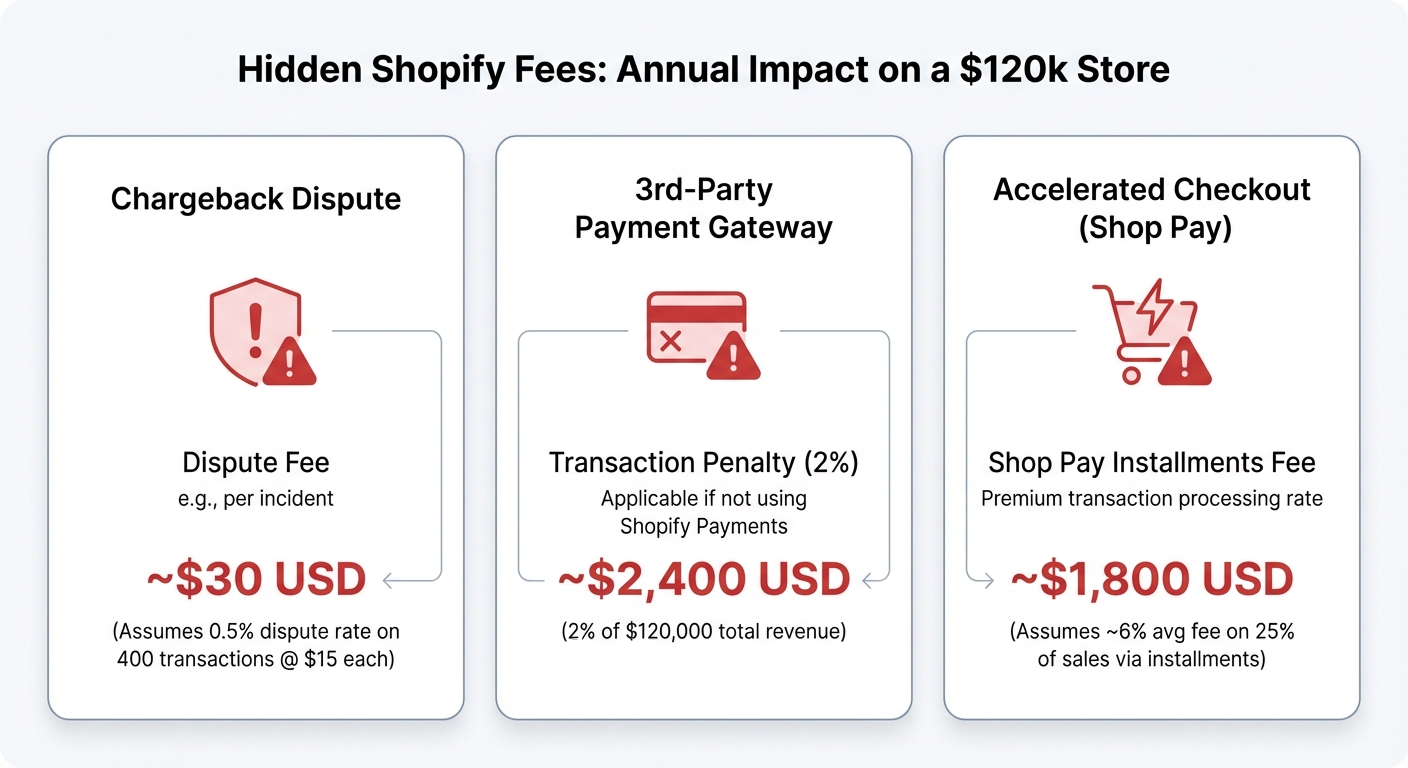
Chargeback Fees: $15 Each
When a customer disputes a charge, Shopify charges you $15 to handle it. These happen. Even the best stores experience chargebacks. If you're processing thousands of orders, expect to pay $15-50/month just in chargeback fees.
Shopify Payments Country Restrictions
Some countries have higher rates with Shopify Payments, or Shopify Payments isn't available at all. If you're in one of those regions, you have to use a third-party gateway, which means you're paying both the gateway fee and Shopify's transaction fee on top.
PayPal's Separate Rates
If you're offering PayPal as a payment option, it's processed separately. PayPal charges 2.2% + $0.30 for goods and services, plus Shopify charges its transaction fee on top. Total hit: around 4.2% + $0.30 on PayPal orders.
Refund Processing Fees
When you issue a refund, you typically eat the payment processing fee. Shopify doesn't refund that $0.30 or the percentage. It's gone.
How to Calculate Your Total Fee Per Order
Here's the formula you can use for your own store:
Total monthly fees = Subscription + (Avg order value × Payment rate) × Number of orders + App costs + Other fees
Then divide by your total orders that month:
Fee per order = Total monthly fees ÷ Number of orders
You can do this in a spreadsheet. Most people are shocked when they actually calculate it. You'll probably realize you're paying way more than you thought.
The Fee You Can Actually Control
Here's the thing: you can't avoid Shopify's fees entirely. But you can optimize.
1. Choose the right plan for your volume. Don't pay for Advanced features if you're doing 100 orders/month. Run the math using the break-even points above.
2. Use Shopify Payments. If you're on Basic or Shopify, using their built-in processor avoids the extra transaction fee. It's simpler, and it's cheaper.
3. Optimize your app stack. Not every app is worth $25/month. Audit your apps quarterly and kill the ones that don't move the needle.
4. Watch for international sales. If you're getting a lot of international transactions, the 1.5% currency conversion fee adds up. At $5,000/month in international orders, that's $75 extra. Consider a separate processor that handles currency better.
5. Track it obsessively. The reason most store owners don't optimize is they don't see the fees. They're deducted before the money hits the bank. You need to look at your Shopify analytics, export your settlement data, and know what you're paying.
FAQ
How much does Shopify take from each order?
On the Shopify plan with an average order value of $50, you're paying about $2.01 per order in combined fees (subscription allocated, payment processing, and apps). But this varies wildly based on your plan, order value, and app usage.
Is Shopify Payments cheaper than Stripe?
For most stores on Shopify, yes. Shopify Payments has no transaction fee on top of payment processing, whereas Stripe requires you to pay Shopify's 1–2% transaction fee in addition to Stripe's processing fees. The math usually favors Shopify Payments.
Do I have to use Shopify Payments?
No. You can use any payment gateway that Shopify supports (Stripe, Square, PayPal, etc.). But you'll pay Shopify's transaction fee on top of the gateway's fees, which makes it more expensive in most cases.
Why do some orders have different fees?
Order value matters (percentage fees), card type matters (debit vs credit, domestic vs international), and whether you're taking the payment as a card transaction or an ACH transfer all affect fees. The fee varies per order.
Can I negotiate Shopify's fees?
Generally no, unless you're a very large merchant doing millions in volume per year. Shopify's rates are fixed based on your plan.
What if I use a third-party app for payments?
You'll pay the app's own fees plus Shopify's transaction fee. This is almost always more expensive than Shopify Payments, but some merchants do it for features or integrations the app provides.
How do I see exactly what I'm paying?
Go to your Shopify admin > Finances > Payouts. Download the settlement report. It shows every fee deducted. Or use Shopimize to see it all visualized, broken down by order, product, and channel.
The Real Picture
Shopify's fees aren't hidden—they're just not obvious. Most store owners know they're paying something, but they don't know what or how much.
The result? They're leaving money on the table. They're paying for plans they don't need. They're using payment methods that cost them extra. They're running apps that don't move revenue.
The stores that win are the ones that understand their fee structure, calculate the break-even points, and optimize ruthlessly.
You've got the framework now. Do the math for your own store. Look at your Shopify settlement data. Figure out your real cost per order.
Once you see it clearly, you can do something about it.
Want to see exactly what fees are eating into your profit — per order, per product, per month? Try Shopimize free and track every fee automatically.