
Shopify Payments vs Third-Party Gateways: The Real Fee Comparison
You're paying for your payment gateway every single day. But are you paying the right amount?
Most Shopify merchants never do the full math on payment processing. They pick a gateway, set it and forget it — and lose hundreds or thousands of dollars annually without realizing it. The difference between Shopify Payments and third-party alternatives can easily reach $3,000–$5,000+ per year on a mid-sized store.
Here's the thing: the headline fee isn't the full story. When you use a third-party gateway like Stripe on Shopify, you don't just pay Stripe's transaction fee. You also pay Shopify's additional transaction fee on top. That's the hidden cost nobody talks about.
Let's do the real math.
[IMAGE PLACEHOLDER: Payment gateway comparison dashboard]
The Hidden Fee Most Merchants Don't Know About
If you're using a third-party payment gateway on Shopify, you're paying two layers of fees:
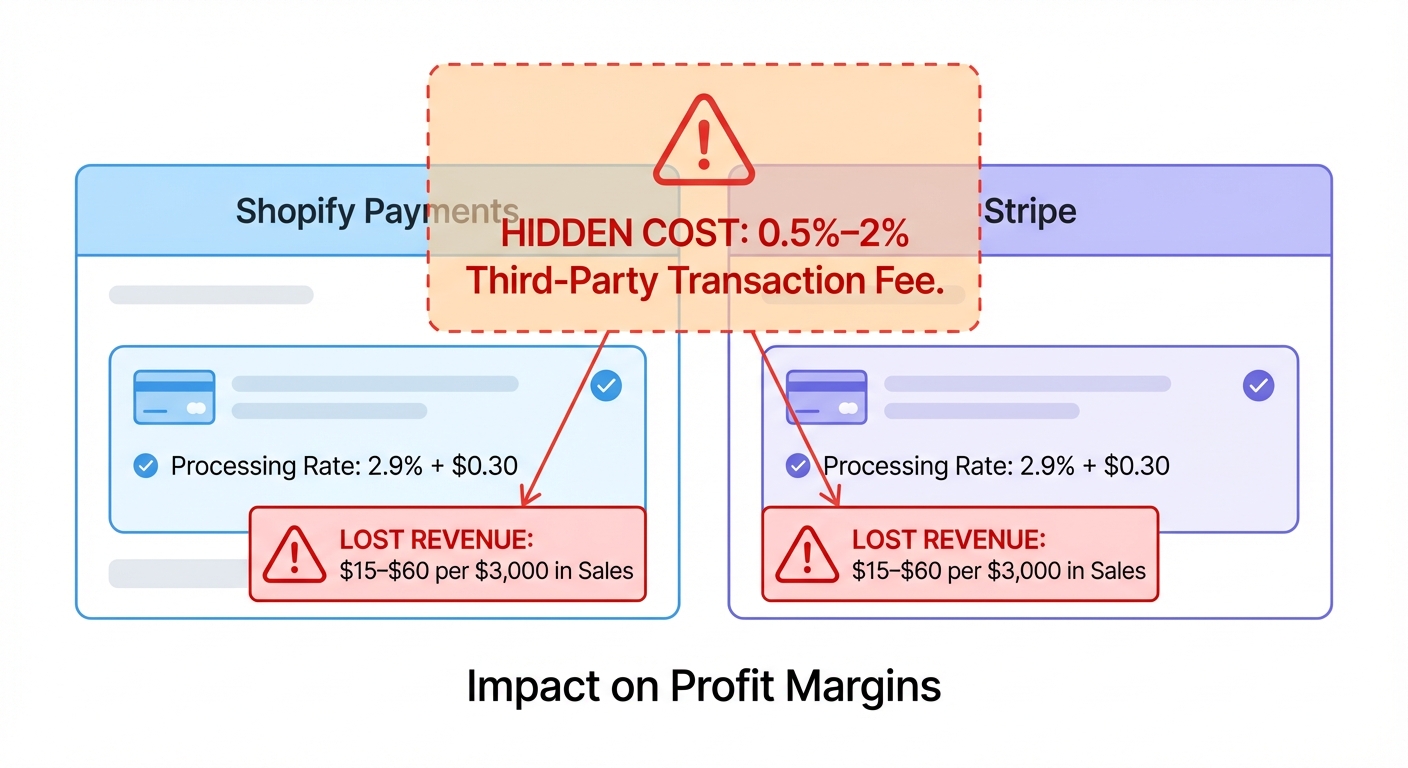
- The gateway's transaction fee (Stripe, PayPal, Authorize.net, etc.)
- Shopify's additional transaction fee (0.5–2%, depending on your plan)
That second one? Most merchants miss it entirely. They see Stripe's 2.9% + $0.30 and think that's the total cost. But if you're on a Shopify Plus plan, you're also paying 2% on top of that. That's 4.9% + $0.30 per transaction before you even know what hit you.
Shopify Payments is different. There's no second fee. Just one clean rate, and you're done.
The Payment Gateway Landscape
Let's break down the four main options available to Shopify merchants:
Shopify Payments
Shopify's native payment processor. Built into your Shopify admin. No setup required beyond a few clicks.
- Credit card rates (vary by plan):
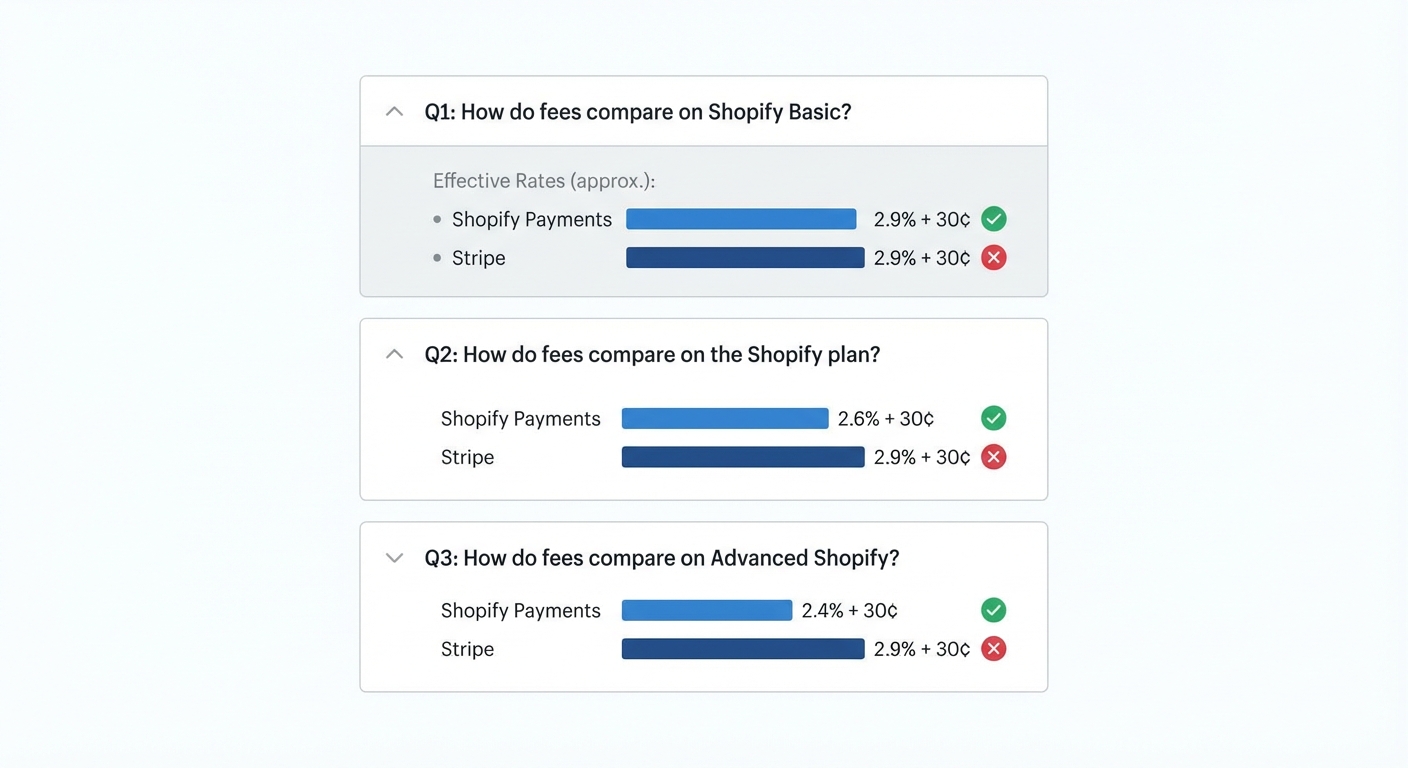
- Shopify Basic: 2.9% + $0.30
- Shopify Standard: 2.7% + $0.30
- Shopify Plus: 2.4% + $0.30
- International cards: 1.5% additional (on top of rates above)
- Currency conversion: 1.5%
- No additional Shopify transaction fee
Stripe (via Shopify)
Popular alternative. You connect Stripe as your third-party processor.
- Credit card rate: 2.9% + $0.30
- International cards: Variable (2.2%–3.9%, depending on card type)
- Additional Shopify transaction fee: 0.5–2% (depending on your plan)
- Currency conversion: 2.9%
PayPal
Familiar to many customers. Offers both payment button and full integration.
- Standard credit card processing: 2.99% + $0.49
- International cards: 3.49% + $0.49
- Additional Shopify transaction fee: 0.5–2% (depending on your plan)
- Currency conversion: Varies (typically 2–4%)
Authorize.net
Lower-profile option. Requires more technical setup.
- Credit card rate: 2.9% + $0.30
- Gateway fee: ~$25/month
- International cards: Variable
- Additional Shopify transaction fee: 0.5–2% (depending on your plan)
- Currency conversion: 2.9%
[IMAGE PLACEHOLDER: Fee structure breakdown chart]
The Comparison Table: True Cost Per Transaction
Here's what you're actually paying across different gateways and Shopify plans:
| Gateway | Shopify Basic (2.9%) | Shopify Standard (2.7%) | Shopify Plus (2.4%) |
|---|---|---|---|
| Shopify Payments | 2.9% + $0.30 | 2.7% + $0.30 | 2.4% + $0.30 |
| Stripe | 5.8% + $0.30 | 5.6% + $0.30 | 4.4% + $0.30 |
| PayPal | 6.48% + $0.79 | 6.18% + $0.79 | 5.48% + $0.79 |
| Authorize.net | 5.8% + $0.30 + $0.81/order* | 5.6% + $0.30 + $0.81/order* | 4.4% + $0.30 + $0.81/order* |
*$25/month gateway fee amortized across ~30 orders
Note: These are US domestic credit card rates only. International cards cost more. Currency conversion fees apply if selling across borders.
Want to see your real numbers?
Try our free profit calculator — plug in your numbers and see your real net margin in 30 seconds.
Try the free calculator →Real-World Examples: What a $60 Order Actually Costs
Let's get specific. Take a typical $60 order. Here's the fee breakdown:
Shopify Payments (Shopify Standard: 2.7% + $0.30)
- Fee: ($60 × 0.027) + $0.30 = $1.62 + $0.30 = $1.92
- You keep: $58.08
Stripe via Shopify (Shopify Standard: 5.6% + $0.30)
- Fee: ($60 × 0.056) + $0.30 = $3.36 + $0.30 = $3.66
- You keep: $56.34
PayPal (Shopify Standard: 6.18% + $0.79)
- Fee: ($60 × 0.0618) + $0.79 = $3.71 + $0.79 = $4.50
- You keep: $55.50
Authorize.net (Shopify Standard: 5.6% + $0.30 + monthly fee split)
- Fee: ($60 × 0.056) + $0.30 + $0.81 = $3.36 + $0.30 + $0.81 = $4.47
- You keep: $55.53
The difference on a single $60 order? $1.74–$2.58 per transaction.
That's not much. But let's see what it looks like over time.
[IMAGE PLACEHOLDER: Side-by-side fee comparison visual]
Annual Cost Comparison: 1,000 Orders Per Month
Now let's scale this to a real business. Say your store processes 1,000 orders per month at an average order value of $60.
Annual transaction volume: 12,000 orders | Annual revenue: $720,000
Shopify Payments
- Monthly cost: $1,920
- Annual cost: $23,040
Stripe via Shopify
- Monthly cost: $3,660
- Annual cost: $43,920
- Cost vs. Shopify Payments: +$20,880/year
PayPal
- Monthly cost: $4,500
- Annual cost: $54,000
- Cost vs. Shopify Payments: +$30,960/year
Authorize.net
- Monthly cost: $4,470
- Annual cost: $53,640
- Cost vs. Shopify Payments: +$30,600/year
That's the difference between keeping an extra $20,000–$31,000 per year or not.
For a store with 50% margins, that's equivalent to selling an extra 6,000–10,000 dollars' worth of product just to break even on the fee difference.
Let that sink in.
[IMAGE PLACEHOLDER: Annual savings bar chart]
When Third-Party Gateways Actually Make Sense
Okay, so Shopify Payments wins on price in most cases. But there are legitimate reasons to choose something else.
Shopify Payments Isn't Available in Your Country
The biggest one. Shopify Payments is only available in select countries: US, Canada, UK, Ireland, Australia, New Zealand, Japan, France, Germany, Spain, Italy, Singapore, Hong Kong, and a few others.
If your store operates outside these regions, you have to use a third-party gateway. No choice. In that case, the comparison is between third-party options only — Stripe, PayPal, or local processors.
What to do: Check Shopify's supported countries list. If you're not covered, evaluate the best third-party option available in your region.
You Need a Specific Payment Method Shopify Payments Doesn't Support
Shopify Payments handles credit and debit cards beautifully. But what if your customers want to pay with:
- Digital wallets (Apple Pay, Google Pay) — Shopify Payments supports these
- Buy Now, Pay Later services (Klarna, Afterpay) — limited on Shopify Payments
- Regional payment methods (iDEAL, Giropay, Bancontact) — very limited on Shopify Payments
- ACH transfers or bank connections — not available on Shopify Payments
If a significant portion of your customer base prefers a payment method unavailable through Shopify Payments, third-party gateways like Stripe or specialized processors might be necessary.
What to do: Look at your customer data. Which payment methods do they request? Then pick a gateway that supports them.
You're a B2B Store with Complex Payment Needs
B2B stores often need:
- Net-30, Net-60 payment terms
- Recurring billing cycles
- ACH or wire transfer capabilities
- Custom reporting and reconciliation
Shopify Payments is built for consumer e-commerce. Authorize.net or specialized B2B processors handle these needs better.
What to do: If you're B2B, evaluate whether the extra cost of a specialized gateway is worth it for your business model.
You Have Extremely High Transaction Volume and Can Negotiate
If you're processing $10M+ in annual transactions, you might qualify for custom pricing from Stripe or PayPal. At that scale, the haggling power might get you rates that undercut Shopify Payments.
This applies to maybe 1% of Shopify stores. If you're wondering if that's you, you'd already know.
What to do: If you process eight figures annually, talk to your gateway's enterprise team.
The PayPal Situation: Addition, Not Replacement
Here's something that confuses people: PayPal on Shopify isn't an either/or choice.
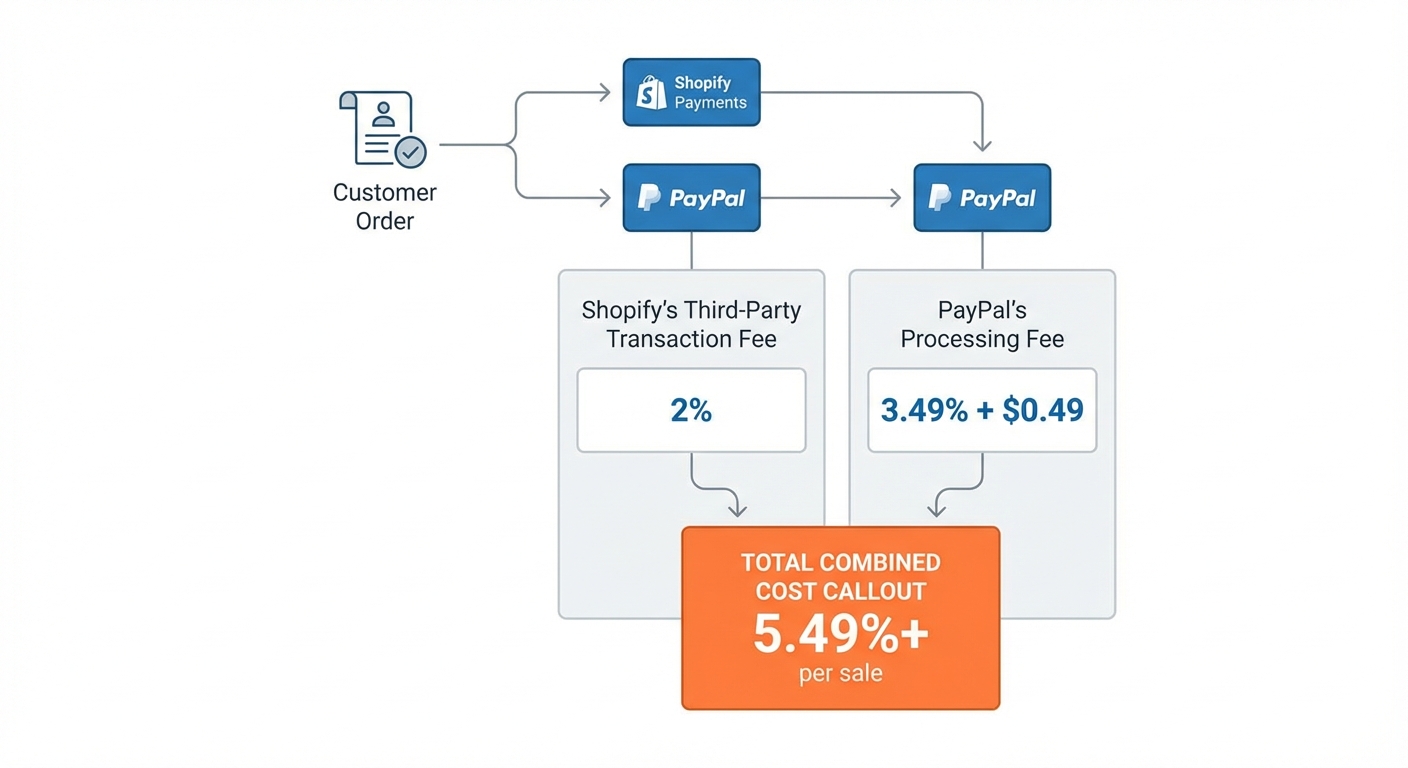
Many merchants offer both Shopify Payments (or Stripe) and PayPal. The PayPal button sits alongside your main gateway, giving customers an extra checkout option.
This makes sense because:
- Some customers strongly prefer PayPal
- It increases conversion by 2–5% for many stores
- The incremental benefit often outweighs the extra fee
So the real question isn't "PayPal or Shopify Payments?" — it's "Should we offer PayPal as an additional payment option?"
And the answer usually is yes, even at 2.99% + $0.49, because the customers you'd otherwise lose are worth more.
But you should absolutely not set PayPal as your only gateway if you have any other choice.
[IMAGE PLACEHOLDER: Multi-payment option checkout screen]
Hidden Costs: The Fees Nobody Talks About
The transaction percentage is just the beginning. Here are other costs hiding in your payment processing:
Chargeback Fees
- Shopify Payments: No chargeback fee (covered by Shopify)
- Third-party gateways: $15–$100 per chargeback
If you process 12,000 orders and have a 0.5% chargeback rate (60 chargebacks), that's $900–$6,000 in extra fees with a third-party gateway.
International Card Processing (Non-US Cards)
- Shopify Payments: Add 1.5% to your rate
- Stripe: Add 0.8%–2.5% depending on card type
- PayPal: Add 0.5%–1.5% depending on card type
If 20% of your orders are international, this adds up fast.
Currency Conversion Fees
- Shopify Payments: 1.5% if accepting multi-currency
- Stripe: 2.9%
- PayPal: 2%–4% depending on currency
Monthly/Annual Fees
- Shopify Payments: None (built into Shopify)
- Stripe: None
- PayPal: None
- Authorize.net: $25/month (industry standard)
Account Holds and Reserves
Some gateways (especially if you're high-risk) hold 5–10% of your revenue for 30–180 days.
Shopify Payments is generally more lenient here, but third-party gateways vary wildly. This is a cash flow issue that can be catastrophic for small stores.
The Recommendation: Shopify Payments for Most Stores
Let's be direct: For most Shopify stores operating in supported countries, Shopify Payments is the right choice.
Here's why:
- It's cheaper — by a lot, especially once you account for the hidden second fee on third-party gateways
- It's integrated — no setup, no plugin conflicts, no reconciliation headaches
- It's transparent — you see everything in your Shopify admin
- It's fast — payouts arrive 1–2 business days after transaction
- It's protected — Shopify covers chargeback fees, fraud monitoring, and PCI compliance
You should consider a third-party gateway if:
- Shopify Payments isn't available in your country
- You need a payment method Shopify Payments doesn't support
- You're B2B and need custom features
- You've got very specific integration requirements
Otherwise? Shopify Payments wins. Every time.
How to Check Your Current Costs
Most merchants don't know how much they're actually paying in fees. Here's how to find out:
- Go to your Shopify admin
- Go to Settings > Apps and sales channels > Payments
- Look at your current payment processor
- Check your monthly settlement reports to see the fees charged
Add up three months of fees. Multiply by four. That's your annual processing cost.
Then use the comparison table above to see what you could be paying instead.
The gap is usually eye-opening.
[IMAGE PLACEHOLDER: Shopify admin showing payment settings]
FAQ
Does Shopify Payments work with my sales channels?
Yes. Shopify Payments is automatically available on your online store, and works seamlessly with most sales channels (Amazon, TikTok Shop, Facebook & Instagram, Google). Some channels like eBay require their own payment processors.
Can I switch from Stripe to Shopify Payments without losing history?
Yes. Switching is safe. Your historical transaction data stays in place. Orders and customer records don't change. You just update which gateway processes new transactions going forward.
What about fraud protection with Shopify Payments?
Shopify Payments includes fraud analysis and chargeback protection. Shopify covers chargeback fees (unlike third-party gateways). You also get dispute resolution tools in your admin.
Does Shopify Payments charge for refunds?
No. Refunds are free with Shopify Payments. (Some third-party gateways charge 2-3% of the refund amount.)
Can I use Shopify Payments if I'm outside the US?
Yes, if you're in a supported country. Check the full list: Canada, UK, Ireland, Australia, New Zealand, Japan, France, Germany, Spain, Italy, Singapore, Hong Kong, Mexico, and more. If your country isn't listed, a third-party gateway is your only option.
Is PayPal on Shopify the same as Stripe?
No. PayPal is 2.99% + $0.49. Stripe (as a third-party on Shopify) is 2.9% + $0.30, plus Shopify's additional fee. PayPal charges slightly more per transaction but doesn't have an additional Shopify fee because PayPal is treated differently. (This is actually a quirk of how Shopify integrates PayPal.)
What if my average order is much higher or lower than $60?
The percentages stay the same, but the dollar amounts change. A $200 order costs roughly 3.3x more in fees than a $60 order (because the percentage applies to the larger amount). Use the percentages in the comparison table to calculate your specific costs.
How often can I change payment gateways?
Anytime. Shopify lets you switch at will. There's no contract or penalty. Just update your settings and new orders route to the new processor.
What about subscription products or recurring charges?
Subscription products usually have lower processing rates (1.5–2.2% depending on gateway and plan). The comparison above is for one-time transactions. If you run a subscription business, the math changes in your favor — recurring charges are cheaper to process.
The Bottom Line
Payment processing fees are one of your biggest business expenses. A single percentage point difference compounds into thousands of dollars over a year.
Do the math for your own store. Pull up your settlement reports. Calculate your current annual fee cost. Then compare it to what you'd pay with Shopify Payments.
The difference might be the most profitable decision you make this quarter.
Want to see exactly how much payment processing is costing you — per order, per month, by gateway? Try Shopimize free and track every fee automatically.