
How App Subscriptions Silently Drain Your Margins
You opened the Shopify App Store to solve a problem. Maybe you needed better email automations, a smarter upsell tool, or a way to recover abandoned carts. You installed the app, it worked, and you moved on. Then you installed another one. And another.
Fast forward 12 months: you're paying for 14 apps, some of which you haven't touched since the first week. But Shopify doesn't add those charges up anywhere visible. Your dashboard shows revenue, orders, and a conversion rate — not the $800/month quietly leaving your account for software you may or may not be using.
That's the Shopify app costs problem. And it's one of the most overlooked margin leaks in e-commerce.
What Are Shopify App Costs, Exactly?
Shopify app costs are the recurring subscription fees (monthly or annual), usage-based charges, and percentage-of-revenue fees that third-party apps bill through your Shopify account. Unlike your ad spend, they don't show up in Facebook Ads Manager. Unlike your cost of goods sold (COGS), they're not tied to individual orders. They just... accumulate.
Most merchants know roughly what they spend on apps. Almost none know precisely. There's a difference.
The Math Nobody Does
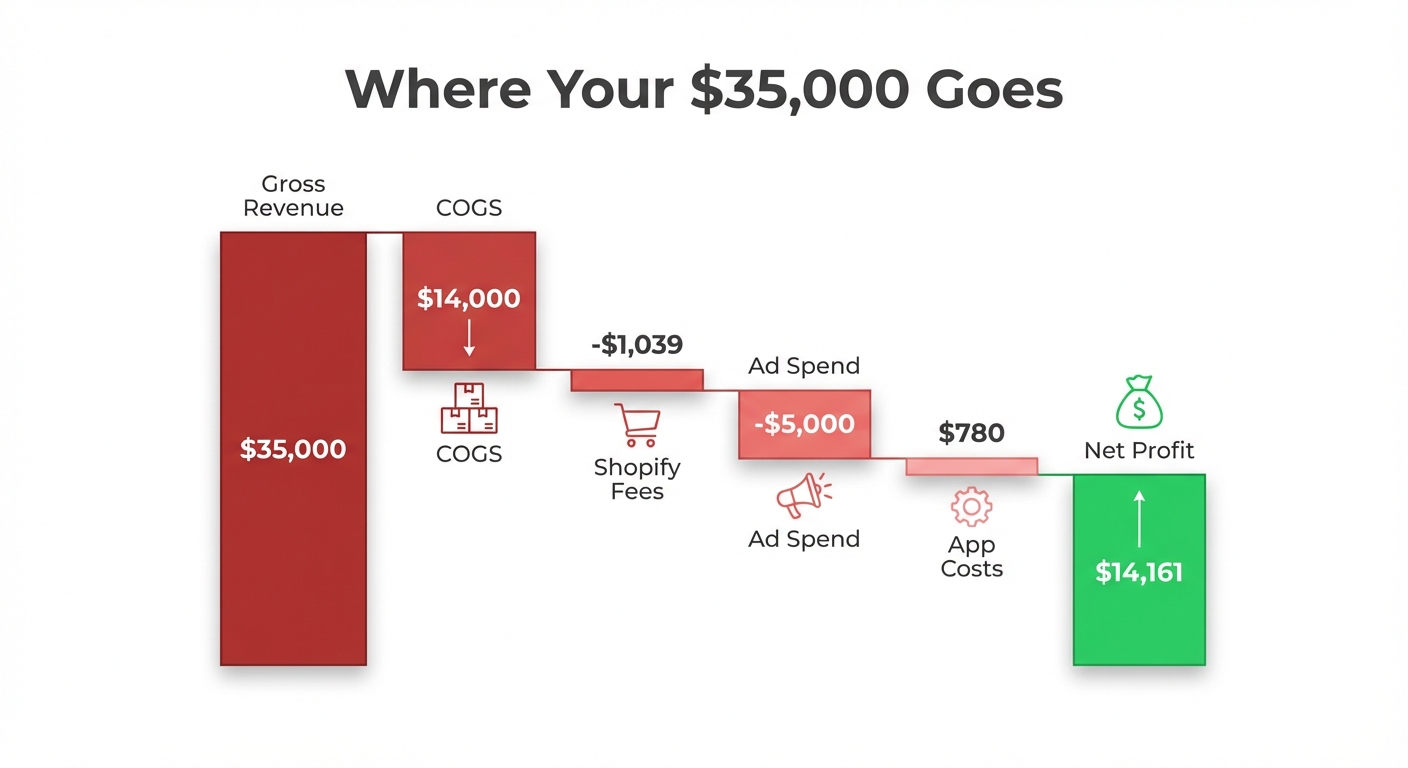
Here's a real scenario. A store doing $35,000/month in revenue looks healthy on paper. Revenue is up, orders are steady. But when you actually account for every cost layer, the picture changes fast.
| Cost Category | Monthly Amount |
|---|---|
| COGS (product + shipping) | $14,000 |
| Shopify plan (Basic) | $39 |
| Shopify Payments fees (~2.9% + 30¢) | ~$1,020 |
| Facebook Ads | $5,000 |
| App subscriptions | $780 |
| Gross revenue | $35,000 |
| Estimated net profit | ~$14,161 |
That $780 in apps represents a 40.5% net margin dropping to 37.8% — not catastrophic in isolation, but look at what's inside that $780:
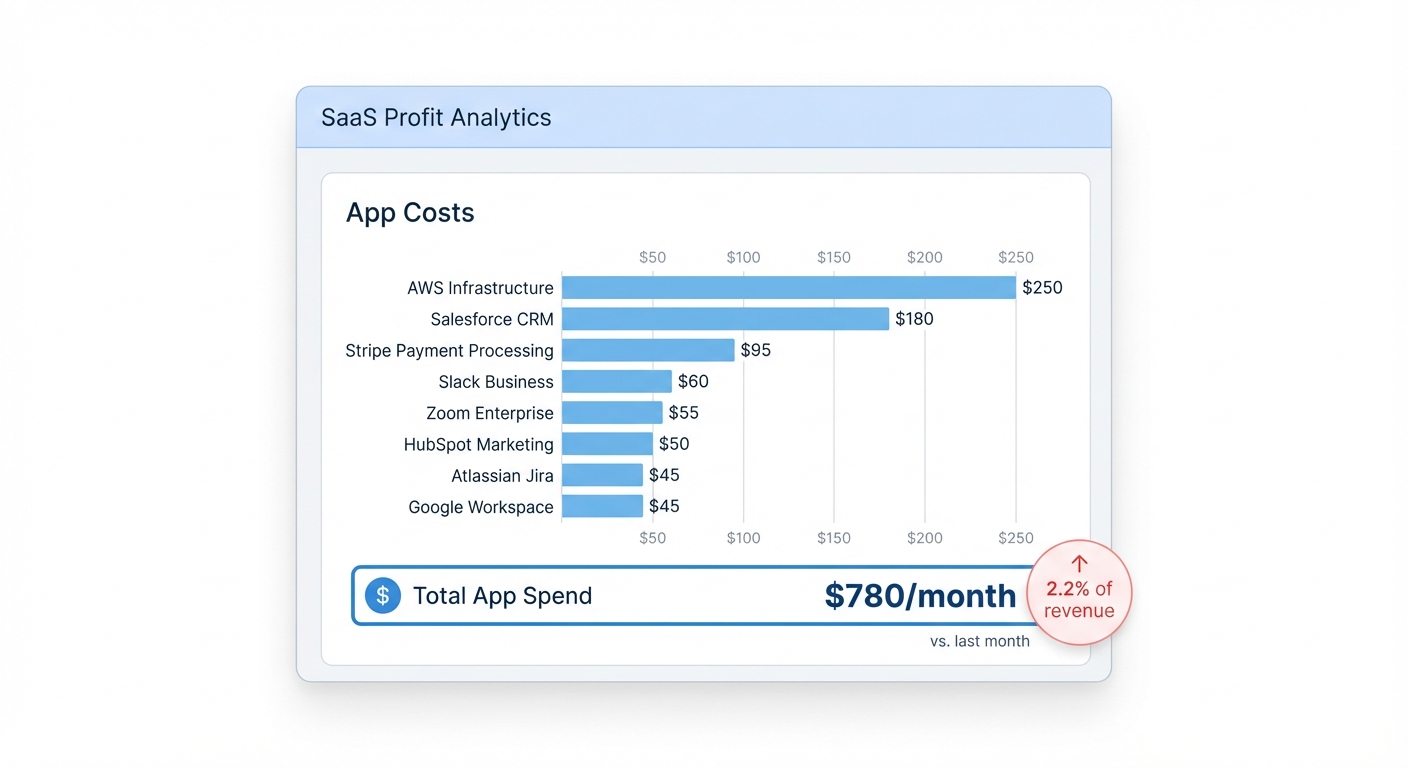
- Email marketing platform: $150/month
- Review app: $119/month
- Upsell / cross-sell tool: $99/month (plus 1% of upsell revenue)
- Subscription management app: $99/month
- Loyalty program: $99/month
- SEO audit tool: $49/month
- Heatmap / analytics tool: $49/month
- Back-in-stock notifications: $29/month
- Affiliate tracking: $89/month
Nine apps. Some of these overlap. The SEO tool was used heavily in Q1 and barely touched since. The subscription management app was installed for a product category they discontinued.
This isn't a made-up horror story. We've seen this pattern — in various forms — across dozens of stores.
Why Shopify App Costs Are So Easy to Ignore
Shopify bills app charges through your account, but the billing summary isn't designed to make you think critically about ROI. You get a line item. You don't get a "here's what this app contributed to revenue last month" alongside it.
There are three reasons merchants underestimate what they're spending.
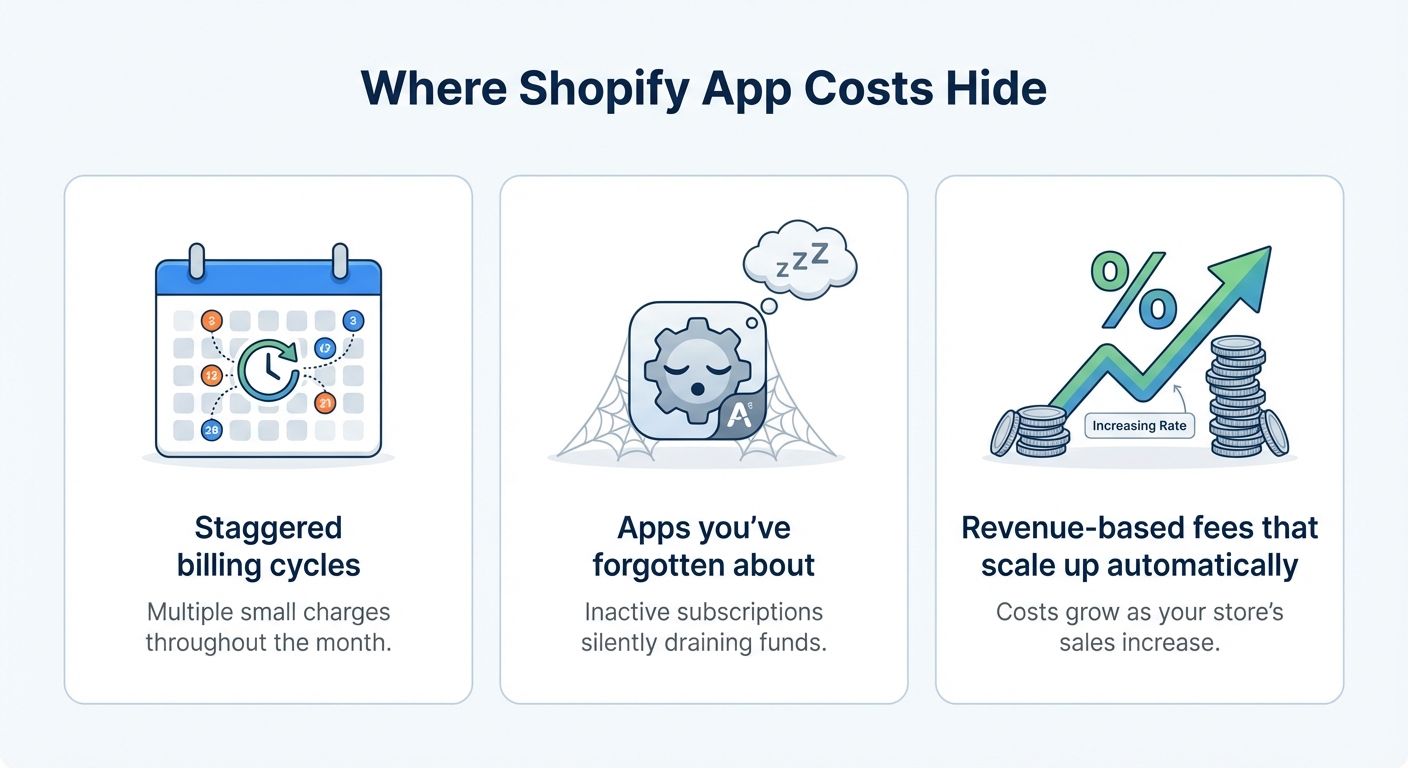
Charges are spread across billing cycles
Some apps charge monthly. Some charge the day you install them and then on the same date each month. Others use 30-day billing from install date. If you installed five apps on five different days, you'll see five charges scattered across the month. It looks like noise rather than a pattern.
The "it might be useful later" trap
Most Shopify merchants are optimistic by nature. You don't cancel an app the moment you stop using it — you keep it around because maybe you'll need it again. That's understandable. But "maybe later" costs real money every month.
Percentage-based fees hide in your revenue
Some apps — particularly upsell tools and affiliate platforms — charge a percentage of the revenue they influence. A 1% fee on $10,000 of upsell revenue is $100. A 2% fee on $20,000 is $400. These charges scale with your revenue, which means they grow without you actively deciding to spend more.
Want to see your real numbers?
Try our free profit calculator — plug in your numbers and see your real net margin in 30 seconds.
Try the free calculator →How to Actually Audit Your App Subscriptions
This doesn't take long. Set aside 20 minutes and follow these steps.
Step 1: Pull your full app billing history
Go to Settings → Billing in your Shopify admin. Click on any monthly bill and look at the "App charges" section. This is the only place Shopify consolidates these charges — and most merchants have never scrolled down to it.
Step 2: List every app and what you're paying
Open a spreadsheet (or just grab a piece of paper). Write down every app you're currently subscribed to and the monthly cost. Include any usage-based fees if you can estimate them from recent bills.
Step 3: For each app, ask two questions
First: Did I use this app in the last 30 days? Second: Can I attribute any revenue or cost savings to it?
If the answer to both is no, that app is a candidate for cancellation. If the answer to the first is yes but the second is no, dig deeper.
Step 4: Identify overlapping features
This is where real savings happen. A lot of Shopify apps do 80% of the same thing with different branding. Your email platform might already have pop-up functionality — do you need a separate pop-up app? Your loyalty app might include referral features — do you need a separate affiliate tool?
Consolidation almost always saves money.
Step 5: Calculate the cost as a % of revenue
Take your total monthly app spend and divide it by your gross monthly revenue. Then multiply by 100. If you're spending $780 on apps and making $35,000 in revenue, that's 2.2% of revenue going to software. For a store with a 15% net margin, that's a meaningful slice.
You can use our free profit calculator to see how app costs factor into your actual net margin alongside COGS, Shopify fees, and ad spend.
The Apps That Are Most Likely Costing You More Than They're Worth
Not every app category is equal. Some deliver clear, measurable ROI. Others are much harder to justify.
Hard to justify without clear attribution
- SEO tools — Organic traffic improvements take months to measure and are often influenced by many factors simultaneously. If you're not actively running an SEO strategy, a $49-$99/month SEO app is probably not earning its keep.
- Heatmap and session recording tools — These are incredibly valuable when you're actively doing conversion rate optimization. If you haven't looked at the heatmaps in 60 days, you're paying for data you're not using.
- Loyalty and rewards programs — These can absolutely work, but they need consistent promotion and a customer base that returns frequently. For stores with low repeat purchase rates, a loyalty program is often underutilized.
Usually worth keeping if used properly
- Email and SMS marketing platforms — Direct ROI is measurable. If your email revenue in Klaviyo or Omnisend is clearly attributable and exceeds the cost, keep it.
- Cart abandonment and upsell tools — Same logic. If the app shows you $X recovered or $X in upsell revenue and that number exceeds your monthly fee, it's paying for itself.
- Subscription management (if you sell subscriptions) — Essential if you use it, useless if you don't.
The key word throughout is measurable. If you can't draw a line between the app and revenue or savings, you're paying on faith.
What a $200/Month Cut Actually Does to Your Margins
Let's go back to that store doing $35,000/month. If they audit their apps and cut $200/month — which is entirely realistic after removing a duplicate tool and canceling the unused SEO app — here's what changes.
Before the cut: net profit ≈ $14,161 (40.4% net margin).
After the cut: net profit ≈ $14,361 (41.0% net margin).
That's an extra $2,400 per year in profit from a 20-minute audit. No new ad campaigns. No new products. No price increases. Just stopping payments for things that weren't pulling their weight.
Multiply that across a store doing $100,000/month and the same proportional cut becomes $6,000+ per year.
The Real Problem: You Can't Fix What You Can't See
Here's the honest challenge. Even if you do this audit today, you'll need to do it again in six months because you'll install more apps. And your billing will shift. And you'll forget what you cancelled.
The deeper issue is that most merchants track revenue carefully and track costs loosely. Shopify's native dashboard doesn't add up your total operating costs in one view. You're left stitching together your Shopify bill, your ad spend dashboards, your shipping costs, and your COGS manually — or not at all.
That's why app costs sneak up on merchants who are otherwise on top of their business. They're not being careless. They just don't have a single place that shows total cost against total revenue, so the margin erosion happens gradually and invisibly.
Shopify's own billing and payment documentation shows how app charges work at the platform level — but it doesn't help you understand their impact on profit. That gap is real.
Turning App Cost Awareness Into a Habit
The merchants who manage margins well don't do one big annual audit and forget about it. They make cost visibility a regular habit. That means:
- Reviewing app charges once a month, not once a year
- Asking "is this still working?" before each renewal, not after
- Treating software spend the same way they treat ad spend — with an expectation of measurable return
The mindset shift is simple: every app is a line item with a job. If it's not doing the job, it goes.
Shopify App Costs Are Just One Piece of Your True Profit Picture
Managing Shopify app costs is one of the fastest ways to improve your margins without changing anything about how you acquire or serve customers. A 20-minute audit, a few cancellations, and you've added real dollars back to your bottom line.
But app subscriptions are just one layer. Shopify transaction fees, Shopify Payments processing costs, shipping costs that scale with order volume, ad spend that may or may not be profitable at the product level — all of these combine to create the gap between what you see in Shopify and what you actually keep.
The only way to close that gap is to see all of it in one place. Shopimize connects directly to your Shopify store and shows you real profit — after COGS, fees, shipping, ad spend, and yes, app costs — so you always know what you're actually making, not just what you're selling.
Frequently Asked Questions
How do I see all my Shopify app charges in one place?
Go to Settings → Billing in your Shopify admin and open any monthly invoice. App charges are listed as a separate line item group within the invoice. For a full history, click through previous months manually. Shopify doesn't offer a native summary view across multiple months, which is why most merchants underestimate their total app spend.
Can Shopify app fees really affect my profit margin significantly?
Yes — and more than most merchants expect. If you're spending $600-$800/month on apps and your net margin is 15-20%, that app spend alone can represent one to two full percentage points of margin. For a store doing $50,000/month, that's $7,200-$9,600 per year. The impact is proportional to your margin: the thinner your margins, the more app costs matter.
What's a reasonable amount to spend on Shopify apps?
There's no universal benchmark, but a reasonable starting point is keeping total app costs below 2-3% of gross revenue — and only if those apps are contributing measurable value. A store doing $20,000/month should scrutinize any app spend above $400-$600/month. The better question isn't the total number but whether each app can demonstrate a return greater than its cost.