
Shopify refund fees are costing you more than you think
Most store owners know refunds hurt. A customer sends something back, you lose the sale, maybe you eat the return shipping cost. It's annoying, but manageable — right?
Not quite. The part that actually stings is what happens to the fees you already paid when that order came in. Shopify refund fees are a quiet drain on your margins, and the math is uglier than most merchants realize until they've seen it laid out in front of them.
Let's fix that.
What are Shopify refund fees?
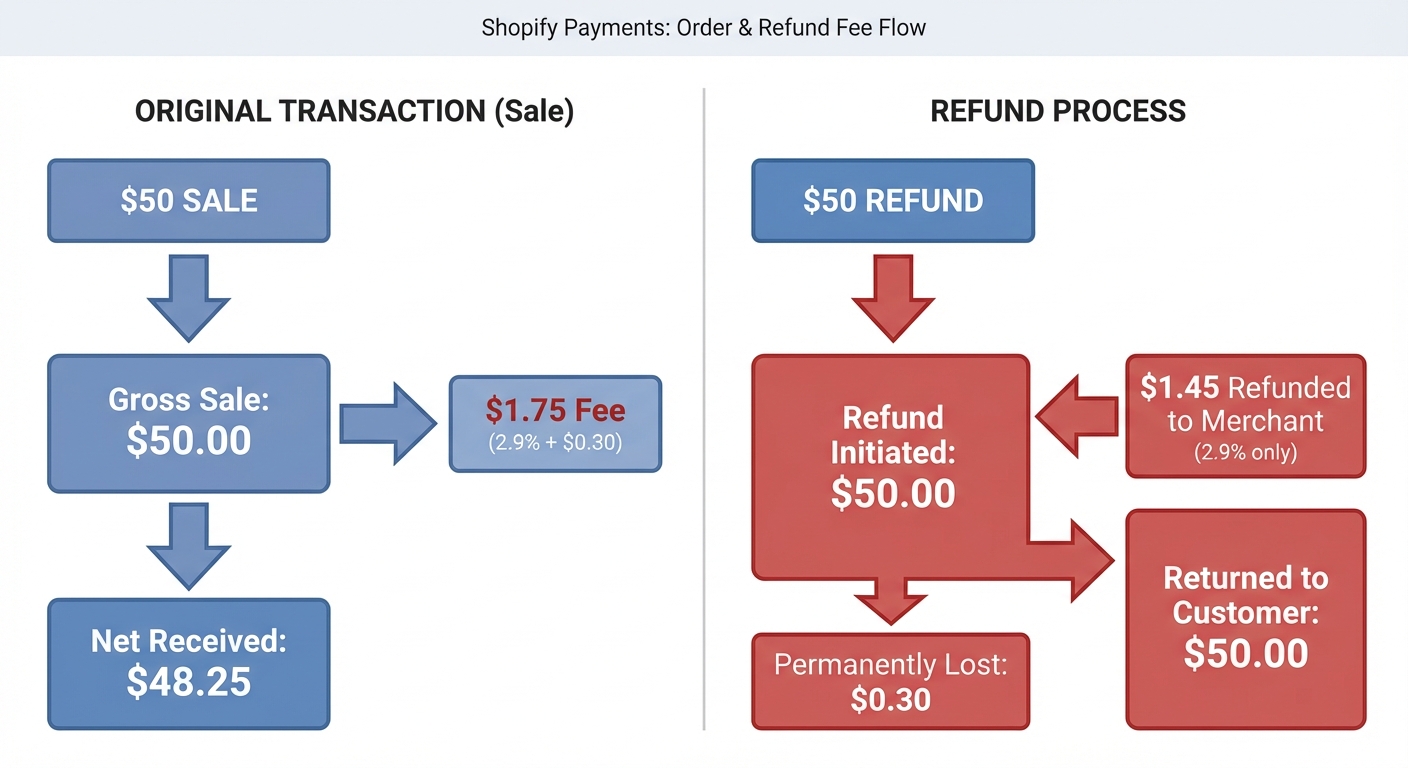
When a customer places an order through your Shopify store, Shopify Payments charges a transaction fee — typically 2.9% + $0.30 for online orders on the Basic plan. When that order is refunded, Shopify refunds the 2.9% portion back to you. But the $0.30 flat fee? That's gone. You don't get it back.
That's the core of the issue. The fixed portion of the payment processing fee is non-refundable, and it applies to every single refund, no matter how small or large the order.
The actual math on a refund
Let's use a real example so this isn't abstract.
Say you sell a $50 item. On Shopify Payments Basic:
- Transaction fee charged: $1.75 (2.9% × $50 = $1.45 + $0.30)
- Fee refunded when order is refunded: $1.45 (just the 2.9%)
- Fee you keep paying: $0.30
So you lost a $50 sale, you gave the customer back their $50 — and you're still $0.30 lighter. On one refund, that's basically nothing.
Now let's scale it. If your store does $80,000/month in revenue with a 10% refund rate, that's $8,000 in refunded orders every month. At a $0.30 loss per transaction, and assuming an average order value of $50 (so roughly 160 refunded orders), you're eating $48/month just in non-refunded flat fees.
That's $576 a year — gone. No product, no customer, no revenue.
And that's before we talk about the rest of what a refund actually costs you.
The real cost of a refund is bigger than the fee
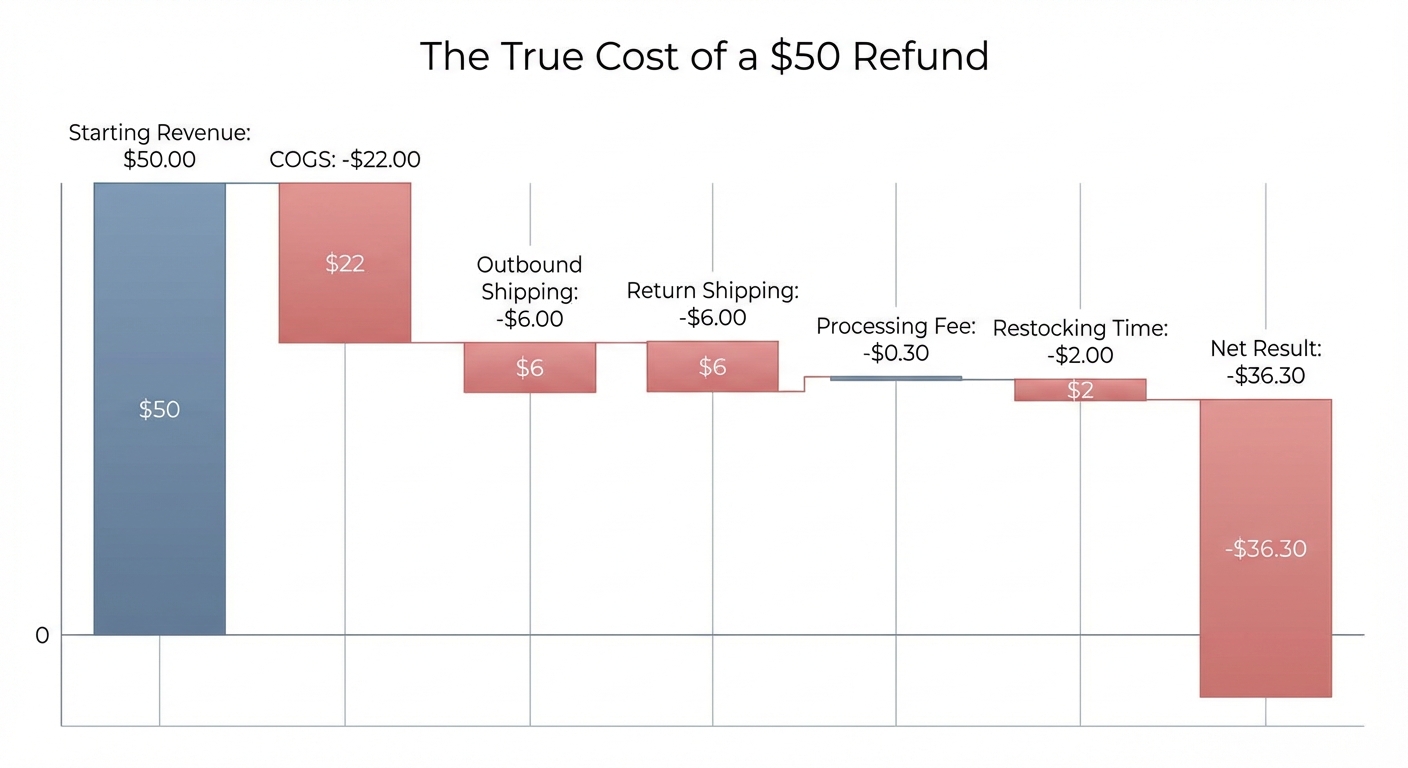
The $0.30 loss is just the starting point. Here's what a typical refund actually costs a Shopify merchant:
Payment processing fee (partial, non-refundable)
As covered above: the $0.30 flat fee per transaction doesn't come back. On higher-value orders, this matters less proportionally — but it's always there.
Outbound shipping
You already shipped the order. Unless you're charging customers for return shipping (and many stores don't, to stay competitive), you paid to send a product out that came right back. On a standard USPS ground package, that could be $4–$8 you'll never see again.
Return shipping
If your policy covers return labels, add another $4–$8. Some merchants eat both legs of shipping on a single refund.
Original cost of goods sold (COGS)
This one's obvious but worth saying: if the product is damaged, used, or can't be resold, you're absorbing the full cost of goods sold (COGS) on top of everything else.
Restocking and handling time
Even when you get the product back in sellable condition, someone has to inspect it, repackage it, and re-list it. If you have staff or use a 3PL, that has a dollar cost. If it's you, it has an opportunity cost.
Add it up
On a $50 order with a $22 COGS, $6 outbound shipping, $6 return shipping, $2 in restocking time, and $0.30 in non-refunded fees:
Your refund cost: $36.30 on a $50 order you made nothing on.
That's not a minor inconvenience. That's a meaningful hit to your actual profitability — and it compounds fast if your refund rate is above average.
Want to see your real numbers?
Try our free profit calculator — plug in your numbers and see your real net margin in 30 seconds.
Try the free calculator →Why refund rates matter more at thin margins
The average e-commerce return rate hovers around 20–30% depending on the category, according to Shopify's own research. Fashion and apparel often runs higher. If you're selling clothing with a 25% return rate and a 30% net margin before returns, refunds alone can cut your effective margin to single digits.
This is why tracking your refund rate isn't just a customer service metric. It's a profitability metric.
A store doing $100,000/month in gross revenue with a 25% return rate has $75,000 in net revenue after refunds. If the economics above apply, those 25% of returned orders aren't just zero-revenue — they're negative-margin events. The orders that did convert need to carry the cost of the ones that didn't.
Where Shopify's reporting falls short
Here's the frustrating part: Shopify's native analytics don't give you a clear view of this.
Your Shopify dashboard will show you gross revenue and refund amounts — but it doesn't net out all the costs we just described. You can see that $8,000 was refunded. You can't easily see that those refunds actually cost you $11,000 when you factor in fees, shipping on both legs, and COGS.
That gap between what Shopify shows you and what's actually happening to your profit is exactly the problem Shopimize was built to solve.
How to calculate your true refund cost
You don't need to do this math by hand every month, but understanding the formula helps.
True cost per refund = COGS + outbound shipping cost + return shipping cost + non-refunded payment fee + restocking cost
Monthly refund drag = True cost per refund × number of refunds
Effective refund rate impact = Monthly refund drag ÷ gross monthly revenue
A quick worked example:
- Average COGS: $22
- Outbound shipping: $6
- Return shipping: $5
- Non-refunded fee: $0.30
- Restocking: $2
- True cost per refund: $35.30
- 160 refunds/month × $35.30 = $5,648/month in real refund costs
- On $80,000 gross revenue: 7.1% of your revenue is being consumed by refunds
That number might surprise you. Most merchants have a vague sense that refunds are "bad" but don't know the actual percentage hit. You can plug in your own numbers using our free profit calculator to see what refunds are really doing to your margins.
Five ways to reduce the cost of refunds
Reducing your refund rate is obviously the goal. But some refunds are inevitable, so the strategy is two-part: reduce frequency AND reduce the cost per incident.
1. Improve your product descriptions and photos
A large portion of returns happen because the product didn't match expectations. Better photos (multiple angles, lifestyle shots, size context), honest descriptions, and accurate sizing guides reduce "not what I expected" returns significantly. This is one of the highest-ROI changes most stores can make.
2. Review which products have the highest refund rates
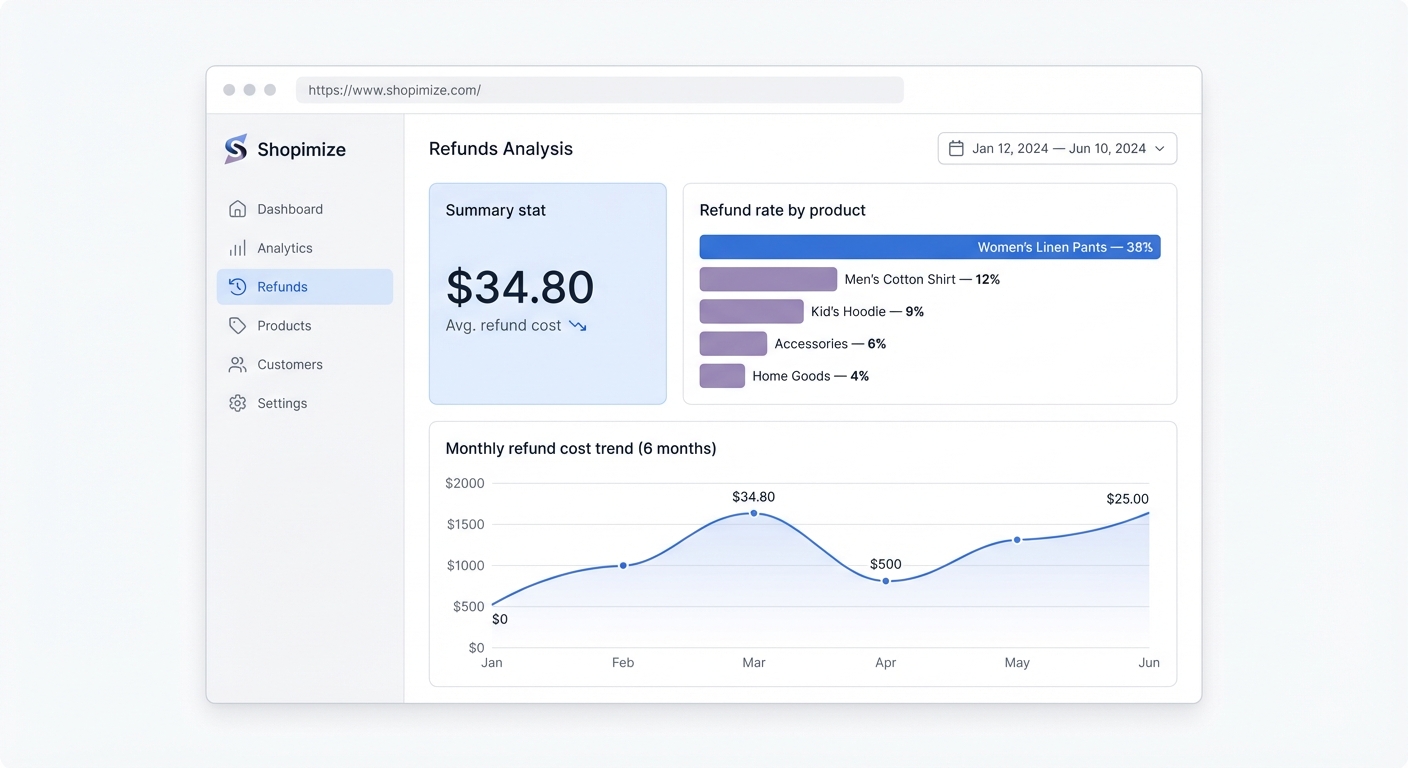
Not all SKUs are equal. If one product has a 40% return rate and another has 5%, they're very different businesses hiding inside your store. Tracking refund rate by product lets you decide whether to fix the listing, discontinue the SKU, or adjust pricing to account for the true economics.
3. Switch to store credit instead of cash refunds
Store credit keeps revenue in the business. A $50 refund that becomes a $50 store credit means you still have the customer, you still have a future sale, and you've avoided the non-refunded fee hit. Many stores that offer both options find a meaningful percentage of customers choose credit — especially if you offer a small bonus (e.g., $55 in credit for a $50 return).
4. Charge for return shipping on certain categories
This is a trade-off — it can reduce conversion rates if shoppers notice it. But for products in categories with consistently high return rates (especially fashion), charging for returns shifts some of the cost back to the customer decision. You can be selective: free returns on orders above a certain threshold, paid below.
5. Inspect your 3PL or fulfillment process
Damaged products are a major driver of refunds. If you use a 3PL, make sure packaging standards are high enough that items arrive intact. A spike in damage-related returns is often a fulfillment process problem, not a product problem.
What tracking your refund costs actually changes
When merchants start seeing their refund costs in real numbers — not just a refund count or a percentage — behavior changes.
A store owner who knows they've lost $5,648 this month to refunds thinks differently about return policy decisions. They consider whether free return shipping on all orders is actually sustainable at their margin. They look at which products are driving that number and whether the listings need work.
The data creates accountability that gut feel never does.
That's why Shopimize tracks all of this automatically. Every refund is netted against your revenue, fees, COGS, and shipping data — so your profit dashboard always reflects what you've actually earned, not just what came in before things went back out. No spreadsheet required.
The real lesson about Shopify refund fees
Shopify refund fees — specifically the non-refundable $0.30 flat fee per transaction — are just the most visible piece of a much larger problem. The true cost of a refund is almost always three to five times the fee alone, once you account for shipping, COGS, and time.
Most merchants underestimate their refund impact because their reporting shows them gross numbers. The stores that actually protect their margins are the ones who measure refund costs the same way they measure ad spend: precisely, and against actual profit.
If you're not sure what refunds are really costing your store, that's the first thing worth finding out.
Start seeing your real numbers
Shopimize connects to your Shopify store and automatically calculates your true profit after COGS, fees, shipping, and refunds — in real time, without spreadsheets. You'll see exactly what refunds are costing you, which products are dragging your margins, and where you're actually making money.
Try Shopimize free for 14 days and see your real profit for the first time.
Frequently asked questions
Does Shopify refund transaction fees when you issue a refund?
Partially. Shopify Payments refunds the percentage-based portion of the fee (e.g., 2.9% on the Basic plan) but does not refund the fixed $0.30 per-transaction fee. So on a $50 refund, you get back $1.45 but keep paying the $0.30. If you're using a third-party payment gateway instead of Shopify Payments, the fee behavior depends on that gateway's own refund policy — many do not refund any portion of the fee.
How do I see refund costs in my Shopify analytics?
Shopify's native reports show you total refund amounts and refund counts, but they don't net out fees, shipping costs, or COGS against those refunds. To see the true cost of your refunds — including all associated costs — you need either a dedicated profit analytics tool or a custom spreadsheet that manually accounts for each cost component.
What's a normal refund rate for a Shopify store?
It varies a lot by category. General merchandise stores often see 5–10%. Apparel and fashion stores can see 20–30% or higher, particularly for items where fit and color accuracy matter. A "normal" refund rate is less useful than your own trend over time — if your rate is rising, that's a signal worth investigating regardless of the industry average. Shopify's enterprise returns research has useful benchmarks by category.
Can I reduce the $0.30 non-refunded fee by upgrading my Shopify plan?
No. The fixed $0.30 fee is the same across all Shopify Payments plans (Basic, Shopify, and Advanced). Upgrading your plan lowers the percentage rate (from 2.9% down to 2.4% on Advanced), but the flat portion remains $0.30 and remains non-refundable. The real way to reduce this cost is to reduce your refund frequency, not your plan tier.